'%20d='M0%203h96v1h-96z'/%3E%3Cpattern%20id='d1'%20width='2'%20height='2'%20patternUnits='userSpaceOnUse'%3E%3Cpath%20fill='%23e1ab20'%20d='M0%200h1v1H0zM1%201h1v1H1z'/%3E%3C/pattern%3E%3Cpath%20fill='url(%23d1)'%20d='M0%207h96v1h-96z'/%3E%3Cpattern%20id='d2'%20width='2'%20height='2'%20patternUnits='userSpaceOnUse'%3E%3Cpath%20fill='%23bc8f1b'%20d='M0%200h1v1H0zM1%201h1v1H1z'/%3E%3C/pattern%3E%3Cpath%20fill='url(%23d2)'%20d='M0%2011h96v1h-96z'/%3E%3Cpattern%20id='d3'%20width='2'%20height='2'%20patternUnits='userSpaceOnUse'%3E%3Cpath%20fill='%2398741b'%20d='M0%200h1v1H0zM1%201h1v1H1z'/%3E%3C/pattern%3E%3Cpath%20fill='url(%23d3)'%20d='M0%2015h96v1h-96z'/%3E%3Cpath%20fill='%23FFFDFB'%20fill-opacity='.75'%20d='M35%204h1v1h-1zM84%203h1v1h-1zM42%201h1v1h-1zM34%203h1v1h-1zM89%206h1v1h-1zM4%208h1v1h-1zM50%202h1v1h-1zM15%208h1v1h-1zM14%202h1v1h-1zM33%207h1v1h-1zM15%203h1v1h-1zM40%202h1v1h-1zM43%205h1v1h-1zM32%203h1v1h-1zM14%202h1v1h-1zM79%204h1v1h-1z'/%3E%3Cpath%20fill='%2316151a'%20fill-opacity='.55'%20d='M70%205h1v1h-1zM71%205h1v1h-1zM72%205h1v1h-1zM73%205h1v1h-1zM74%205h1v1h-1zM70%206h1v1h-1zM74%206h1v1h-1zM75%206h1v1h-1zM70%207h1v1h-1zM75%207h1v1h-1zM70%208h1v1h-1zM72%208h1v1h-1zM73%208h1v1h-1zM75%208h1v1h-1zM70%209h1v1h-1zM75%209h1v1h-1zM70%2010h1v1h-1zM72%2010h1v1h-1zM73%2010h1v1h-1zM75%2010h1v1h-1zM70%2011h1v1h-1zM75%2011h1v1h-1zM70%2012h1v1h-1zM71%2012h1v1h-1zM72%2012h1v1h-1zM73%2012h1v1h-1zM74%2012h1v1h-1zM75%2012h1v1h-1z'/%3E%3Cpath%20fill='%23FFFDFB'%20d='M69%204h1v1h-1zM70%204h1v1h-1zM71%204h1v1h-1zM72%204h1v1h-1zM73%204h1v1h-1zM69%205h1v1h-1zM73%205h1v1h-1zM74%205h1v1h-1zM69%206h1v1h-1zM74%206h1v1h-1zM69%207h1v1h-1zM71%207h1v1h-1zM72%207h1v1h-1zM74%207h1v1h-1zM69%208h1v1h-1zM74%208h1v1h-1zM69%209h1v1h-1zM71%209h1v1h-1zM72%209h1v1h-1zM74%209h1v1h-1zM69%2010h1v1h-1zM74%2010h1v1h-1zM69%2011h1v1h-1zM70%2011h1v1h-1zM71%2011h1v1h-1zM72%2011h1v1h-1zM73%2011h1v1h-1zM74%2011h1v1h-1z'/%3E%3Cpath%20fill='%234f3e1a'%20d='M0%2018h3v4h-3zM3%2017h7v5h-7zM10%2016h6v6h-6zM16%2015h4v7h-4zM20%2015h5v7h-5zM25%2018h3v4h-3zM28%2019h4v3h-4zM32%2016h6v6h-6zM38%2016h7v6h-7zM45%2014h4v8h-4zM49%2014h6v8h-6zM55%2016h7v6h-7zM62%2019h7v3h-7zM69%2018h6v4h-6zM75%2017h3v5h-3zM78%2016h3v6h-3zM81%2019h4v3h-4zM85%2019h6v3h-6zM91%2019h3v3h-3zM94%2015h5v7h-5z'/%3E%3Cpath%20fill='%23F4C533'%20d='M1%2021h1v1h-1zM7%2019h1v1h-1zM13%2019h1v1h-1zM18%2021h1v1h-1zM22%2021h1v1h-1zM21%2020h1v1h-1zM26%2019h1v1h-1zM30%2021h1v1h-1zM29%2020h1v1h-1zM34%2020h1v1h-1zM39%2017h1v1h-1zM39%2017h1v1h-1zM46%2017h1v1h-1zM50%2020h1v1h-1zM58%2018h1v1h-1zM70%2021h1v1h-1zM71%2021h1v1h-1zM76%2019h1v1h-1zM76%2018h1v1h-1zM79%2019h1v1h-1zM82%2021h1v1h-1zM82%2020h1v1h-1zM89%2020h1v1h-1zM88%2020h1v1h-1zM92%2021h1v1h-1zM92%2021h1v1h-1zM95%2016h1v1h-1zM95%2020h1v1h-1z'/%3E%3C/svg%3E)
In short
On February 10, 2026, Microsoft launched AI Performance in Bing Webmaster Tools, the first dashboard from a major search engine dedicated to tracking citations in AI responses. It lets you measure how often your content is cited by Copilot, which pages are referenced, and which queries trigger those citations. In June 2026, Microsoft expanded it with four new analysis dimensions (intents, topics, citation share, and Compare). It is the concrete starting point for steering your Generative Engine Optimization (GEO) strategy.
Why a dedicated AI citation report changes the game
Until now, measuring visibility in AI-generated responses was a kludge, like querying ChatGPT or Copilot manually, using third-party tools like Profound, or simply crossing your fingers. With AI Performance, Bing crosses a threshold by offering the first structured, official report dedicated to AI citations.
It is not trivial. Google folds its AI Overviews data into the global Performance report in Search Console, with no isolation and no per-URL count. Bing takes the lead by isolating these metrics in a dedicated space, an approach the entire SEO and GEO industry was waiting for.
For search professionals, this is the confirmation that Generative Engine Optimization (GEO) is no longer speculation. It is a measurable discipline, with its own KPIs and tracking tools. As Microsoft's official announcement summarizes, AI Performance represents a first step toward native GEO tools inside webmaster platforms .
Dashboard
The AI Performance dashboard in detail
Once your site is verified in Bing Webmaster Tools, the AI Performance report is reachable from the navigation menu on the left. By default, it shows data for the past 30 days. Here is an overview of the dashboard.
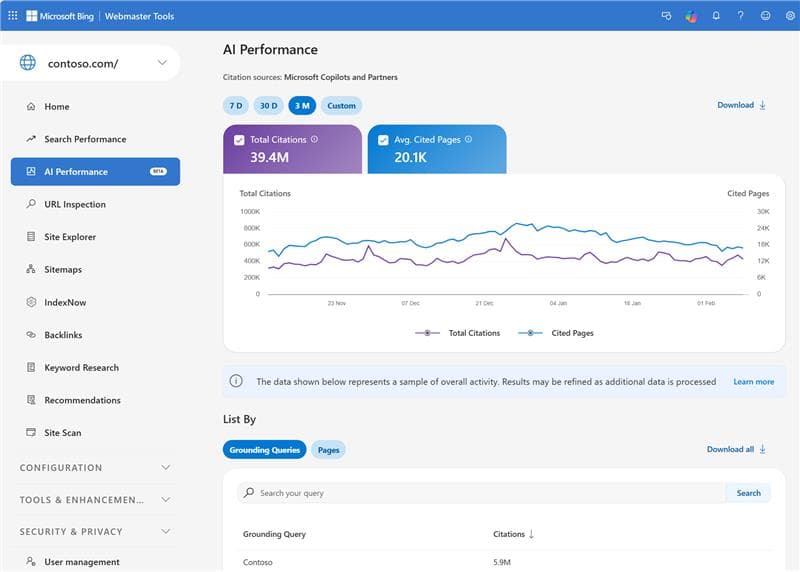
The dashboard is built around 5 key metrics, shown below.
| Metric | Description | Strategic use |
|---|---|---|
| Total Citations | How many times your site is cited in AI responses over the selected period | Main KPI to measure your global GEO visibility |
| Average Cited Pages | Daily average of unique pages from your site referenced by AI | Indicator of citation depth. Is AI tapping a single article or your whole site? |
| Grounded Queries | Queries Bing reformulates to retrieve your content in AI responses | Reveals which search intents your content covers and helps identify topics to strengthen |
| Page-Level Citations | Citation count per URL, identifying your most-referenced pages | Prioritize updates and reinforcement of your most cited pages |
| Visibility Trends | Timeline showing how your AI citations evolve over time | Correlate peaks/troughs with your editorial actions to identify what works |
Grounded Queries
Understanding Grounded Queries, the new battlefield
Grounded queries are probably the most interesting metric in the report, and the most misunderstood. Unlike classic search queries, they do not represent what the user typed.
When a user asks Copilot a question, the system internally rephrases that question into one or more micro-queries optimized for content retrieval. Those rephrasings are what Bing calls "grounded queries". For example, a user asking "how to improve my marketing team's productivity" could generate grounded queries like "marketing team productivity strategies 2026" or "marketing project management tools".
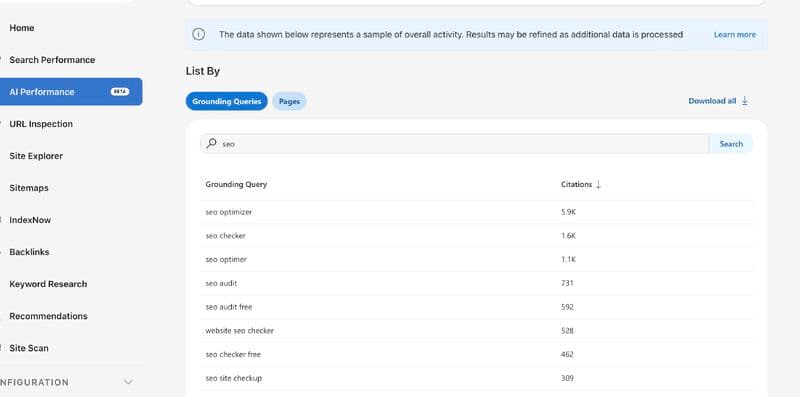
Why it is strategic? Grounded queries show you exactly which search intents your content covers within the AI ecosystem. It is the GEO equivalent of the Search Console "Queries" report. Analyze them to spot the topics where you are strong and the gaps to close.
According to Otterly.ai's data, a mid-sized site can generate several hundred unique grounded queries over a 3-month period. Their analysis surfaced 647 unique queries triggering 30,398 grounding events across 173 pages .
New
The June 2026 updates, four dimensions to analyze your AI citations
On June 16, 2026, Microsoft expanded the AI Performance report with four new dimensions, rolled out in preview globally. They make a raw list of grounded queries readable and usable. Here is what each one brings.
| Dimension | What it brings | Strategic use |
|---|---|---|
| Intents | Classifies your grounded queries by intent (Informational, Commercial, Navigational, Research, Local, Learn and Solve, and more) | Understand why your content is cited and which types of AI interactions surface it |
| Topics | Groups related queries into thematic clusters (for example, solar panels, efficiency, and installation map to a Solar Energy topic) | Spot your emerging authority areas and the coverage gaps to close |
| Citation Share | Shows the share of citations your site captures for a given query, relative to all sources | An observational metric (not a ranking) to tell strong presence from fragmented visibility |
| Compare | Overlays a previous period on the current view and adds Last, Prev, and Diff columns per query | Correlate your editorial actions with citation changes over time |
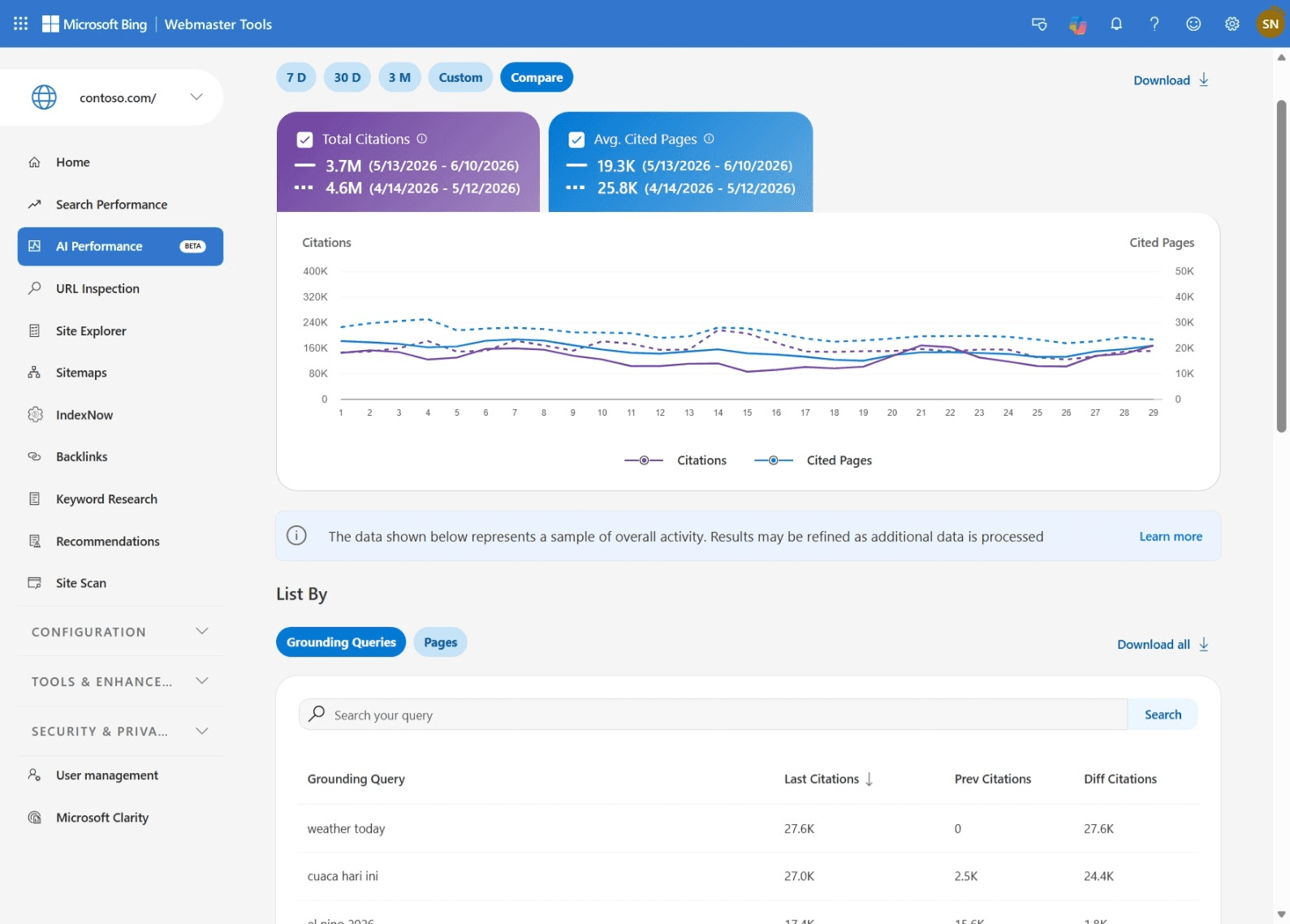
Microsoft notes that the Intents and Topics classifications are still maturing and will sharpen as data accumulates. The GEO recommendations previewed at SEO Week (crawlability, structured data, indexing), however, have not shipped yet, nor have click data and API access, with no announced date .
Comparison
Bing AI Performance versus Google Search Console, the comparison
The question every SEO is asking is how Bing AI Performance compares to what Google offers in Search Console. Here is a detailed comparison.
| Feature | Bing AI Performance | Google Search Console |
|---|---|---|
| Dedicated AI report | Yes (separate dashboard) | No (folded into the global Performance report) |
| Per-URL citation count | Yes | No |
| Grounded queries / AI queries | Yes (rephrased queries) | Partial (mixed with classic queries) |
| Click data from AI | No (planned during 2026) | Partial (AI Overviews clicks counted but not isolated) |
| AI visibility trends | Yes (dedicated timeline) | No |
| API access | No (planned during 2026) | No for AI-specific data |
The takeaway is clear, Bing has taken the lead on AI-specific citation tracking. That does not mean Google will not catch up, but in the meantime, Bing Webmaster Tools is the reference tool.
Tutorial
How to access the AI Performance report
Here are the steps to reach the dashboard and start analyzing your AI citations:
- Go to bing.com/webmasters and sign in with your Microsoft account.
- If not done yet, verify ownership of your site through XML file, meta tag, or DNS record.
- Once verified, click "AI Performance" in the navigation menu on the left.
- The dashboard shows the past 30 days by default. Adjust the date range to your needs.
- Export grounded query data and per-page citations to analyze them in a spreadsheet or BI tool.
Optimization
7 strategies to maximize your Copilot citations
Having access to the data is not enough. Here are 7 concrete strategies to grow your presence in Bing Copilot AI responses, based on GEO best practices and the signals Microsoft favors:
- Structure for extraction by opening each article with a 40-80 word answer capsule that directly answers the question. AI systems favor content whose blocks are easy to extract. Phrase your H2s as real questions that mirror search intents.
- Add quantitative data and expert quotes, because pages enriched with verifiable statistics and attributed citations earn significantly more references. The SE Ranking study shows that pages with 19+ data points reach 5.4 citations on average.
- Implement structured markup, since Article, FAQ, HowTo, and Product schemas help RAG (Retrieval-Augmented Generation) systems understand the contextual relationships in your content. Schema.org markup is especially critical for Copilot citations.
- Keep content fresh with IndexNow, which lets you instantly notify search engines (including Bing) when content is added, modified, or removed. This ensures AI cites the most recent version of your pages. Pages updated in the past 3 months earn 6 citations versus 3.6 for stale content.
- Allow AI crawlers in your robots.txt by checking that Bingbot and OAI-SearchBot (and ChatGPT-User) are not blocked. Many sites accidentally block these crawlers while allowing Googlebot, cutting themselves off from AI visibility.
- Build topical authority, because AI platforms favor content from recognized sources. Diversify your presence on trusted platforms (Reddit, Quora, G2, Trustpilot), earn quality backlinks, and aim for mentions in specialized publications.
- Use precise technical vocabulary, since Princeton's GEO study shows that using precise technical terms can boost visibility by up to 28%. It helps AI match your content to specific queries.
Source Search Engine Journal | GEO study (arXiv) | Bing Blog
Method
The complete GEO workflow, from report to action
Here is a 5-step process to turn AI Performance data into concrete actions:
- Initial audit. Log into Bing Webmaster Tools and analyze your citation baseline over the past 30 days. Note total citations, number of cited pages, and the main grounded queries.
- Opportunity identification. Cross your grounded queries with your existing content. Spot queries where you are cited but content could be reinforced, and queries close to your expertise where you do not yet appear.
- Targeted optimization. For each identified page, apply the 7 strategies above. Prioritize already-cited pages (reinforcement) and create content for the detected gaps.
- Bi-monthly tracking. GEO optimizations propagate in 2 to 4 weeks per Princeton researchers. Analyze your metrics every two weeks and document the correlations between your actions and the results.
- Cross-platform reporting. Combine Bing AI Performance data with your ChatGPT monitoring tools (Profound, Hikoo, Otterly) and Google Search Console to get a 360° view of your AI visibility.
AI Performance in Bing Webmaster Tools represents a first step toward native GEO tools. This public preview marks the start of a new era for content publishers, one where performance in AI responses is measured with the same rigor as traditional search .
Current limitations and expected evolutions
The AI Performance report is a public preview and comes with several limitations to keep in mind:
- No click data. The report measures citations, not the actual visits generated. Calculating an "AI click-through rate" is not yet possible.
- Sampled data. Microsoft notes that the data represents a sample, not the full citation activity.
- No API access. The data is not yet exportable through API, limiting reporting automation.
- Short history. The report never goes beyond the rolling window shown in the interface, which rules out any year-over-year comparison.
- No segmentation by AI response type. It is impossible to distinguish citations coming from Copilot, Bing Chat, or integrated partners.
Microsoft is keeping its promises. Advanced segmentation landed on 16 June 2026 with intents, topics, citation share, and the Compare view. Clicks and API access are still missing, and Microsoft only says it will keep evolving these capabilities, with no date. This is a tool to watch very closely.
Frequently asked questions
What is the difference between AI Performance citations and classic Bing impressions?
Classic impressions measure how many times your page appears in traditional search results (blue links). AI Performance citations measure how many times your content is referenced as a source in AI-generated responses (Copilot, Bing Chat). These are fundamentally different metrics, one measures SERP visibility, the other measures conversational visibility.
Can you see the clicks generated by Copilot citations?
Not yet. As of July 2026, the AI Performance report still only provides citation data (frequency, cited pages, grounded queries). Microsoft indicated that complementary metrics, such as clicks and conversions, will arrive during 2026. In the meantime, it is recommended to cross-reference with your Google Analytics data (UTM or "copilot" referrer).
Are grounded queries the actual queries typed by users?
No. Grounded queries are the internal rephrasings Bing uses to search for and retrieve content cited in AI responses. For example, a user asking "how to better manage a remote team" might generate a grounded query like "remote team management strategies 2026". It is how AI interprets the search intent.
Do you need to verify your site in Bing Webmaster Tools to access the report?
Yes. You must have verified ownership of your site (via XML file, meta tag, or DNS) in Bing Webmaster Tools. Once verified, the AI Performance report appears in the navigation menu on the left. Data is available by default for the past 30 days.
Does Google offer an equivalent?
Google folds AI Overviews and AI Mode data into the global Performance report in Search Console, but without a dedicated report or per-URL citation count. Bing is the first engine to isolate AI citation metrics in a specific dashboard, which represents a significant step forward for GEO tracking.
How can I optimize my content to be cited more by Copilot?
Focus on 5 levers, namely (1) structure your pages with direct answers at the start, (2) add quantitative data and expert quotes, (3) implement schema.org markup (Article, FAQ, HowTo), (4) keep content current via IndexNow, and (5) allow AI crawlers (Bingbot, OAI-SearchBot, ChatGPT-User) in your robots.txt.
Conclusion
The launch of AI Performance in Bing Webmaster Tools marks a turning point for the SEO industry. For the first time, content publishers have an official, structured tool to measure their visibility in AI-generated responses.
This report confirms that Generative Engine Optimization (GEO) is now a discipline in its own right, with its own metrics (citations, grounded queries, cited pages) and its own strategies. Brands that integrate AI Performance tracking into their SEO routine today will gain a significant head start.
At Hikoo, we integrate Bing AI Performance data into our multi-AI monitoring platform to give you a complete view of your GEO visibility on ChatGPT, Copilot, Perplexity, and Google AI Overviews. Because the future of search is multi-platform.
Sources
- 1Microsoft Bing Team Introducing AI Performance in Bing Webmaster Tools Public Preview. Bing Blogs, February 2026
- 2Microsoft Bing Team New AI Visibility Insights in Bing Webmaster Tools: Intents, Topics, Citation Share, Compare. Bing Blogs, June 2026
- 3Search Engine Journal Bing Rolls Out AI Citation Share In Webmaster Tools. Search Engine Journal, 2026
- 4Search Engine Land Bing Webmaster Tools officially adds AI Performance report. Search Engine Land, 2026
- 5Search Engine Journal Bing Webmaster Tools Adds AI Citation Performance Data. Search Engine Journal, 2026
- 6Otterly.ai Bing Webmaster Tools AI Performance Report, How to Analyze and Optimize Your Copilot Citations. Otterly.ai Blog, 2026
- 7Aggarwal P., Murahari V., Rajpurohit T., Kalyan A., Narasimhan K., & Deshpande A. GEO, Generative Engine Optimization. arXiv / ACM KDD 2024
- 8Southern M. New Data Reveals The Top 20 Factors Influencing ChatGPT Citations. Search Engine Journal, 2025
- 9Lafferty N. AI Platform Citation Patterns. Profound, 2025

'%20d='M0%204h48v1h-48z'/%3E%3Cpattern%20id='d1'%20width='2'%20height='2'%20patternUnits='userSpaceOnUse'%3E%3Cpath%20fill='%23e3b131'%20d='M0%200h1v1H0zM1%201h1v1H1z'/%3E%3C/pattern%3E%3Cpath%20fill='url(%23d1)'%20d='M0%209h48v1h-48z'/%3E%3Cpattern%20id='d2'%20width='2'%20height='2'%20patternUnits='userSpaceOnUse'%3E%3Cpath%20fill='%23cb9a1b'%20d='M0%200h1v1H0zM1%201h1v1H1z'/%3E%3C/pattern%3E%3Cpath%20fill='url(%23d2)'%20d='M0%2014h48v1h-48z'/%3E%3Cpattern%20id='d3'%20width='2'%20height='2'%20patternUnits='userSpaceOnUse'%3E%3Cpath%20fill='%23a77f1b'%20d='M0%200h1v1H0zM1%201h1v1H1z'/%3E%3C/pattern%3E%3Cpath%20fill='url(%23d3)'%20d='M0%2019h48v1h-48z'/%3E%3Cpath%20fill='%23FFFDFB'%20fill-opacity='.75'%20d='M43%206h1v1h-1zM47%204h1v1h-1zM27%206h1v1h-1zM8%204h1v1h-1zM26%209h1v1h-1zM4%200h1v1h-1zM47%208h1v1h-1zM35%200h1v1h-1zM36%200h1v1h-1z'/%3E%3Cpath%20fill='%2316151a'%20fill-opacity='.55'%20d='M9%203h2v2h-2zM11%203h2v2h-2zM13%203h2v2h-2zM15%203h2v2h-2zM17%203h2v2h-2zM9%205h2v2h-2zM17%205h2v2h-2zM19%205h2v2h-2zM9%207h2v2h-2zM19%207h2v2h-2zM9%209h2v2h-2zM13%209h2v2h-2zM15%209h2v2h-2zM19%209h2v2h-2zM9%2011h2v2h-2zM19%2011h2v2h-2zM9%2013h2v2h-2zM13%2013h2v2h-2zM15%2013h2v2h-2zM19%2013h2v2h-2zM9%2015h2v2h-2zM19%2015h2v2h-2zM9%2017h2v2h-2zM11%2017h2v2h-2zM13%2017h2v2h-2zM15%2017h2v2h-2zM17%2017h2v2h-2zM19%2017h2v2h-2z'/%3E%3Cpath%20fill='%23FFFDFB'%20d='M8%202h2v2h-2zM10%202h2v2h-2zM12%202h2v2h-2zM14%202h2v2h-2zM16%202h2v2h-2zM8%204h2v2h-2zM16%204h2v2h-2zM18%204h2v2h-2zM8%206h2v2h-2zM18%206h2v2h-2zM8%208h2v2h-2zM12%208h2v2h-2zM14%208h2v2h-2zM18%208h2v2h-2zM8%2010h2v2h-2zM18%2010h2v2h-2zM8%2012h2v2h-2zM12%2012h2v2h-2zM14%2012h2v2h-2zM18%2012h2v2h-2zM8%2014h2v2h-2zM18%2014h2v2h-2zM8%2016h2v2h-2zM10%2016h2v2h-2zM12%2016h2v2h-2zM14%2016h2v2h-2zM16%2016h2v2h-2zM18%2016h2v2h-2z'/%3E%3Cpath%20fill='%234f3e1a'%20d='M0%2021h4v6h-4zM4%2019h3v8h-3zM7%2023h4v4h-4zM11%2019h6v8h-6zM17%2020h7v7h-7zM24%2023h3v4h-3zM27%2023h6v4h-6zM33%2022h3v5h-3zM36%2020h7v7h-7zM43%2022h4v5h-4zM47%2019h3v8h-3z'/%3E%3Cpath%20fill='%23F4C533'%20d='M2%2026h1v1h-1zM1%2026h1v1h-1zM5%2021h1v1h-1zM5%2020h1v1h-1zM12%2022h1v1h-1zM18%2022h1v1h-1zM25%2025h1v1h-1zM29%2024h1v1h-1zM34%2024h1v1h-1zM34%2025h1v1h-1zM40%2025h1v1h-1zM44%2026h1v1h-1zM44%2024h1v1h-1zM48%2021h1v1h-1z'/%3E%3C/svg%3E)
'%20d='M0%204h48v1h-48z'/%3E%3Cpattern%20id='d1'%20width='2'%20height='2'%20patternUnits='userSpaceOnUse'%3E%3Cpath%20fill='%23e5b63d'%20d='M0%200h1v1H0zM1%201h1v1H1z'/%3E%3C/pattern%3E%3Cpath%20fill='url(%23d1)'%20d='M0%209h48v1h-48z'/%3E%3Cpattern%20id='d2'%20width='2'%20height='2'%20patternUnits='userSpaceOnUse'%3E%3Cpath%20fill='%23d6a21b'%20d='M0%200h1v1H0zM1%201h1v1H1z'/%3E%3C/pattern%3E%3Cpath%20fill='url(%23d2)'%20d='M0%2014h48v1h-48z'/%3E%3Cpattern%20id='d3'%20width='2'%20height='2'%20patternUnits='userSpaceOnUse'%3E%3Cpath%20fill='%23b2871b'%20d='M0%200h1v1H0zM1%201h1v1H1z'/%3E%3C/pattern%3E%3Cpath%20fill='url(%23d3)'%20d='M0%2019h48v1h-48z'/%3E%3Cpath%20fill='%23FFFDFB'%20fill-opacity='.75'%20d='M44%206h1v1h-1zM15%207h1v1h-1zM28%203h1v1h-1zM39%207h1v1h-1zM44%207h1v1h-1zM13%202h1v1h-1zM22%203h1v1h-1zM26%205h1v1h-1zM19%209h1v1h-1z'/%3E%3Cpath%20fill='%2316151a'%20fill-opacity='.55'%20d='M11%203h2v2h-2zM13%203h2v2h-2zM15%203h2v2h-2zM17%203h2v2h-2zM19%203h2v2h-2zM11%205h2v2h-2zM19%205h2v2h-2zM21%205h2v2h-2zM11%207h2v2h-2zM21%207h2v2h-2zM11%209h2v2h-2zM15%209h2v2h-2zM17%209h2v2h-2zM21%209h2v2h-2zM11%2011h2v2h-2zM21%2011h2v2h-2zM11%2013h2v2h-2zM15%2013h2v2h-2zM17%2013h2v2h-2zM21%2013h2v2h-2zM11%2015h2v2h-2zM21%2015h2v2h-2zM11%2017h2v2h-2zM13%2017h2v2h-2zM15%2017h2v2h-2zM17%2017h2v2h-2zM19%2017h2v2h-2zM21%2017h2v2h-2z'/%3E%3Cpath%20fill='%23FFFDFB'%20d='M10%202h2v2h-2zM12%202h2v2h-2zM14%202h2v2h-2zM16%202h2v2h-2zM18%202h2v2h-2zM10%204h2v2h-2zM18%204h2v2h-2zM20%204h2v2h-2zM10%206h2v2h-2zM20%206h2v2h-2zM10%208h2v2h-2zM14%208h2v2h-2zM16%208h2v2h-2zM20%208h2v2h-2zM10%2010h2v2h-2zM20%2010h2v2h-2zM10%2012h2v2h-2zM14%2012h2v2h-2zM16%2012h2v2h-2zM20%2012h2v2h-2zM10%2014h2v2h-2zM20%2014h2v2h-2zM10%2016h2v2h-2zM12%2016h2v2h-2zM14%2016h2v2h-2zM16%2016h2v2h-2zM18%2016h2v2h-2zM20%2016h2v2h-2z'/%3E%3Cpath%20fill='%234f3e1a'%20d='M0%2019h5v8h-5zM5%2021h4v6h-4zM9%2020h7v7h-7zM16%2023h3v4h-3zM19%2022h7v5h-7zM26%2020h6v7h-6zM32%2021h5v6h-5zM37%2019h3v8h-3zM40%2021h7v6h-7zM47%2021h5v6h-5z'/%3E%3Cpath%20fill='%23F4C533'%20d='M1%2024h1v1h-1zM3%2021h1v1h-1zM6%2026h1v1h-1zM17%2024h1v1h-1zM23%2023h1v1h-1zM20%2026h1v1h-1zM28%2026h1v1h-1zM29%2024h1v1h-1zM35%2026h1v1h-1zM38%2020h1v1h-1zM44%2026h1v1h-1zM44%2022h1v1h-1zM50%2025h1v1h-1z'/%3E%3C/svg%3E)
'%20d='M0%204h48v1h-48z'/%3E%3Cpattern%20id='d1'%20width='2'%20height='2'%20patternUnits='userSpaceOnUse'%3E%3Cpath%20fill='%23e1ab21'%20d='M0%200h1v1H0zM1%201h1v1H1z'/%3E%3C/pattern%3E%3Cpath%20fill='url(%23d1)'%20d='M0%209h48v1h-48z'/%3E%3Cpattern%20id='d2'%20width='2'%20height='2'%20patternUnits='userSpaceOnUse'%3E%3Cpath%20fill='%23bd8f1b'%20d='M0%200h1v1H0zM1%201h1v1H1z'/%3E%3C/pattern%3E%3Cpath%20fill='url(%23d2)'%20d='M0%2014h48v1h-48z'/%3E%3Cpattern%20id='d3'%20width='2'%20height='2'%20patternUnits='userSpaceOnUse'%3E%3Cpath%20fill='%2399751b'%20d='M0%200h1v1H0zM1%201h1v1H1z'/%3E%3C/pattern%3E%3Cpath%20fill='url(%23d3)'%20d='M0%2019h48v1h-48z'/%3E%3Cpath%20fill='%23FFFDFB'%20fill-opacity='.75'%20d='M36%204h1v1h-1zM28%209h1v1h-1zM30%206h1v1h-1zM14%205h1v1h-1zM1%205h1v1h-1zM40%209h1v1h-1zM5%209h1v1h-1zM46%203h1v1h-1zM16%200h1v1h-1z'/%3E%3Cpath%20fill='%2316151a'%20fill-opacity='.55'%20d='M9%203h2v2h-2zM11%203h2v2h-2zM13%203h2v2h-2zM15%203h2v2h-2zM17%203h2v2h-2zM9%205h2v2h-2zM17%205h2v2h-2zM19%205h2v2h-2zM9%207h2v2h-2zM19%207h2v2h-2zM9%209h2v2h-2zM13%209h2v2h-2zM15%209h2v2h-2zM19%209h2v2h-2zM9%2011h2v2h-2zM19%2011h2v2h-2zM9%2013h2v2h-2zM13%2013h2v2h-2zM15%2013h2v2h-2zM19%2013h2v2h-2zM9%2015h2v2h-2zM19%2015h2v2h-2zM9%2017h2v2h-2zM11%2017h2v2h-2zM13%2017h2v2h-2zM15%2017h2v2h-2zM17%2017h2v2h-2zM19%2017h2v2h-2z'/%3E%3Cpath%20fill='%23FFFDFB'%20d='M8%202h2v2h-2zM10%202h2v2h-2zM12%202h2v2h-2zM14%202h2v2h-2zM16%202h2v2h-2zM8%204h2v2h-2zM16%204h2v2h-2zM18%204h2v2h-2zM8%206h2v2h-2zM18%206h2v2h-2zM8%208h2v2h-2zM12%208h2v2h-2zM14%208h2v2h-2zM18%208h2v2h-2zM8%2010h2v2h-2zM18%2010h2v2h-2zM8%2012h2v2h-2zM12%2012h2v2h-2zM14%2012h2v2h-2zM18%2012h2v2h-2zM8%2014h2v2h-2zM18%2014h2v2h-2zM8%2016h2v2h-2zM10%2016h2v2h-2zM12%2016h2v2h-2zM14%2016h2v2h-2zM16%2016h2v2h-2zM18%2016h2v2h-2z'/%3E%3Cpath%20fill='%234f3e1a'%20d='M0%2022h7v5h-7zM7%2021h6v6h-6zM13%2021h6v6h-6zM19%2022h6v5h-6zM25%2021h4v6h-4zM29%2020h7v7h-7zM36%2021h5v6h-5zM41%2024h6v3h-6zM47%2022h3v5h-3z'/%3E%3Cpath%20fill='%23F4C533'%20d='M2%2026h1v1h-1zM10%2023h1v1h-1zM11%2022h1v1h-1zM14%2026h1v1h-1zM16%2026h1v1h-1zM23%2023h1v1h-1zM23%2025h1v1h-1zM26%2022h1v1h-1zM31%2026h1v1h-1zM34%2021h1v1h-1zM37%2024h1v1h-1zM43%2026h1v1h-1zM48%2026h1v1h-1z'/%3E%3C/svg%3E)