'%20d='M0%203h96v1h-96z'/%3E%3Cpattern%20id='d1'%20width='2'%20height='2'%20patternUnits='userSpaceOnUse'%3E%3Cpath%20fill='%23e4b336'%20d='M0%200h1v1H0zM1%201h1v1H1z'/%3E%3C/pattern%3E%3Cpath%20fill='url(%23d1)'%20d='M0%207h96v1h-96z'/%3E%3Cpattern%20id='d2'%20width='2'%20height='2'%20patternUnits='userSpaceOnUse'%3E%3Cpath%20fill='%23d09d1b'%20d='M0%200h1v1H0zM1%201h1v1H1z'/%3E%3C/pattern%3E%3Cpath%20fill='url(%23d2)'%20d='M0%2011h96v1h-96z'/%3E%3Cpattern%20id='d3'%20width='2'%20height='2'%20patternUnits='userSpaceOnUse'%3E%3Cpath%20fill='%23ab821b'%20d='M0%200h1v1H0zM1%201h1v1H1z'/%3E%3C/pattern%3E%3Cpath%20fill='url(%23d3)'%20d='M0%2015h96v1h-96z'/%3E%3Cpath%20fill='%23FFFDFB'%20fill-opacity='.75'%20d='M24%208h1v1h-1zM19%205h1v1h-1zM29%209h1v1h-1zM13%203h1v1h-1zM37%206h1v1h-1zM55%202h1v1h-1zM51%205h1v1h-1zM86%205h1v1h-1zM50%209h1v1h-1zM46%202h1v1h-1zM77%205h1v1h-1zM54%207h1v1h-1zM61%207h1v1h-1zM37%200h1v1h-1zM42%206h1v1h-1zM12%208h1v1h-1z'/%3E%3Cpath%20fill='%2316151a'%20fill-opacity='.55'%20d='M70%205h1v1h-1zM71%205h1v1h-1zM72%205h1v1h-1zM73%205h1v1h-1zM74%205h1v1h-1zM70%206h1v1h-1zM74%206h1v1h-1zM75%206h1v1h-1zM70%207h1v1h-1zM75%207h1v1h-1zM70%208h1v1h-1zM72%208h1v1h-1zM73%208h1v1h-1zM75%208h1v1h-1zM70%209h1v1h-1zM75%209h1v1h-1zM70%2010h1v1h-1zM72%2010h1v1h-1zM73%2010h1v1h-1zM75%2010h1v1h-1zM70%2011h1v1h-1zM75%2011h1v1h-1zM70%2012h1v1h-1zM71%2012h1v1h-1zM72%2012h1v1h-1zM73%2012h1v1h-1zM74%2012h1v1h-1zM75%2012h1v1h-1z'/%3E%3Cpath%20fill='%23FFFDFB'%20d='M69%204h1v1h-1zM70%204h1v1h-1zM71%204h1v1h-1zM72%204h1v1h-1zM73%204h1v1h-1zM69%205h1v1h-1zM73%205h1v1h-1zM74%205h1v1h-1zM69%206h1v1h-1zM74%206h1v1h-1zM69%207h1v1h-1zM71%207h1v1h-1zM72%207h1v1h-1zM74%207h1v1h-1zM69%208h1v1h-1zM74%208h1v1h-1zM69%209h1v1h-1zM71%209h1v1h-1zM72%209h1v1h-1zM74%209h1v1h-1zM69%2010h1v1h-1zM74%2010h1v1h-1zM69%2011h1v1h-1zM70%2011h1v1h-1zM71%2011h1v1h-1zM72%2011h1v1h-1zM73%2011h1v1h-1zM74%2011h1v1h-1z'/%3E%3Cpath%20fill='%234f3e1a'%20d='M0%2016h3v6h-3zM3%2014h7v8h-7zM10%2016h3v6h-3zM13%2016h3v6h-3zM16%2018h4v4h-4zM20%2018h7v4h-7zM27%2018h3v4h-3zM30%2015h4v7h-4zM34%2018h5v4h-5zM39%2019h6v3h-6zM45%2016h6v6h-6zM51%2018h5v4h-5zM56%2014h6v8h-6zM62%2014h7v8h-7zM69%2014h5v8h-5zM74%2018h3v4h-3zM77%2019h7v3h-7zM84%2015h4v7h-4zM88%2015h5v7h-5zM93%2014h6v8h-6z'/%3E%3Cpath%20fill='%23F4C533'%20d='M1%2017h1v1h-1zM7%2016h1v1h-1zM11%2018h1v1h-1zM14%2018h1v1h-1zM17%2020h1v1h-1zM23%2021h1v1h-1zM28%2021h1v1h-1zM28%2021h1v1h-1zM32%2021h1v1h-1zM36%2020h1v1h-1zM42%2021h1v1h-1zM49%2017h1v1h-1zM54%2020h1v1h-1zM67%2019h1v1h-1zM75%2021h1v1h-1zM75%2021h1v1h-1zM81%2020h1v1h-1zM80%2021h1v1h-1zM90%2018h1v1h-1zM97%2016h1v1h-1zM95%2021h1v1h-1z'/%3E%3C/svg%3E)
In short
Since 13 May 2026, GA4 automatically assigns the medium "ai-assistant" and the campaign "(ai-assistant)" to sessions whose referrer is a recognised assistant, then groups them into an AI Assistants channel. That channel excludes Google AI Overviews and AI Mode, which stay inside Organic Search. A custom channel group is still worth building, to add assistants Google does not recognise and to apply your own definition retroactively. Neither method captures visits whose referrer was stripped, nor citations that never got clicked.
Framing
What does GA4 actually measure when you say AI traffic?
GA4 measures clicks. When someone reads a ChatGPT answer, clicks a link to your site and loads the page, GA4 records a session. When that same person reads your brand name in the answer and never clicks, GA4 records nothing. Settle this before you configure anything, because it decides what your reporting can honestly claim.
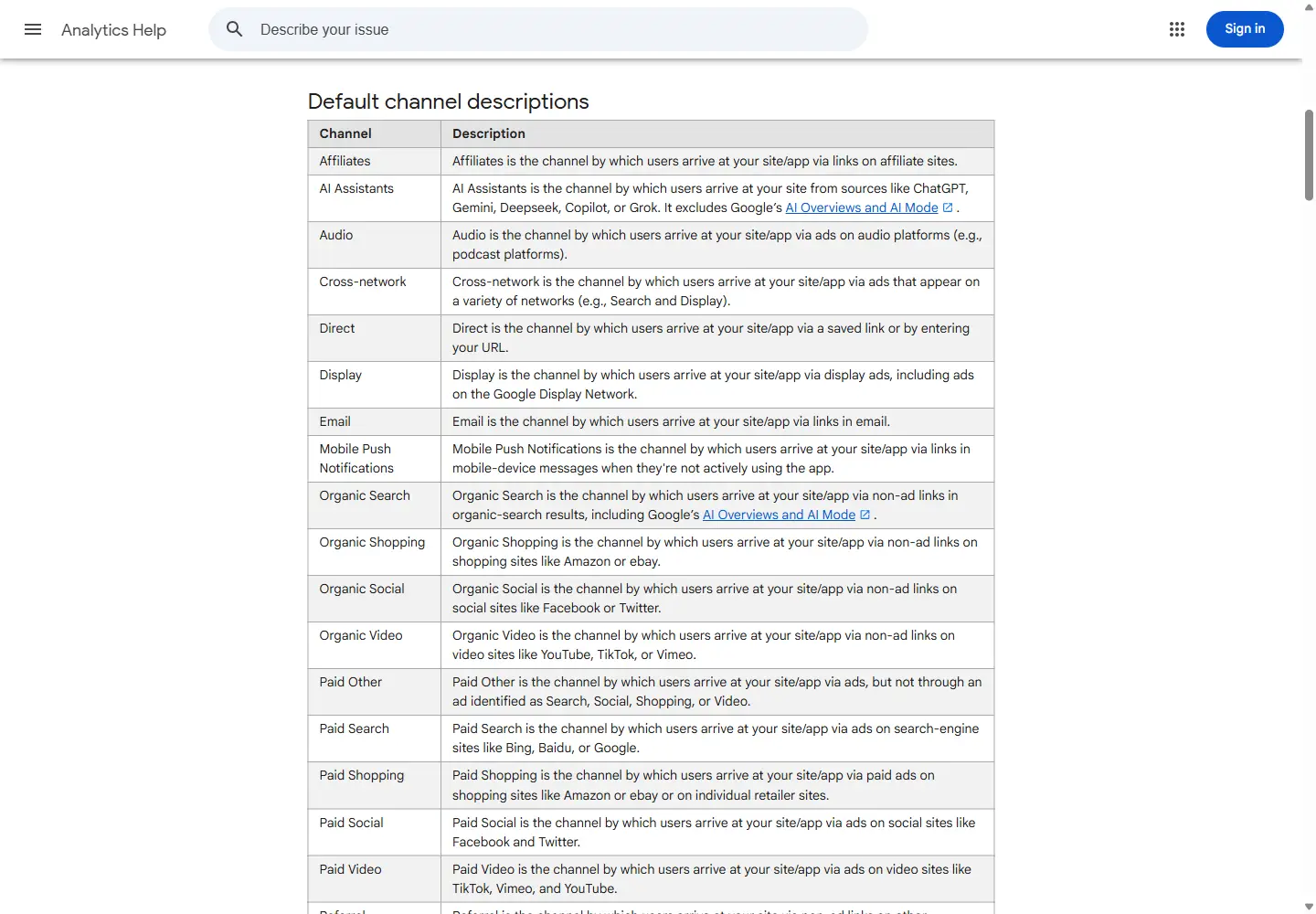
Since 13 May 2026, Google Analytics automatically assigns the medium "ai-assistant" to a session when the referrer matches a recognised assistant. The campaign is set to "(ai-assistant)" and the session lands in the AI Assistants channel of the default channel group. Google describes that channel as the one by which users arrive at your site from sources like ChatGPT, Gemini, Deepseek, Copilot or Grok, and states that it excludes Google AI Overviews and AI Mode. Those two surfaces stay in organic search, since the official Organic Search definition now includes them explicitly. A GA4 property therefore gives you two separate views of AI traffic, one named view for conversational assistants, and one invisible view mixed into the rest of Google Search.
Google does not publish the list of referrers it treats as assistants. We cannot promise that a given assistant is covered on a given day. The only reliable check is your own report, reading the real values of the Session source dimension.
- GA4 sees clicks, not citations. A heavily cited brand with no clicked link stays invisible in GA4.
- The AI Assistants channel excludes Google AI Overviews and AI Mode, which are counted as organic search.
- The list of referrers Google recognises is not public and can change without notice.
- Sessions that lose their referrer fall into Direct and never surface in any AI channel.
Google Analytics Help, default channel group | What's new in Google Analytics, 13 May 2026
Location
Where this data lives in GA4
It all happens in one report, Traffic acquisition. It describes where sessions come from, new and returning, unlike the User acquisition report which only covers first visits. For AI traffic that distinction matters, because the same person often comes back several times after one assistant answer.
- Open Reports, then Acquisition, then Traffic acquisition.
- Keep "Session default channel group" as the primary dimension so the AI Assistants row shows up.
- Switch to "Session source / medium" to read the raw values, for example chatgpt.com / ai-assistant.
- Use the search bar above the table to isolate one referrer, typing chatgpt.com and pressing Enter.
- Add "Landing page + query string" as a secondary dimension to see which pages receive those visits.
| Dimension | What it holds | How to read it for AI traffic |
|---|---|---|
| Session default channel group | The channel computed by Google's rules | The AI Assistants row, aggregated across every assistant |
| Session source | The referrer host, or the utm_source value | chatgpt.com, perplexity.ai, gemini.google.com |
| Session medium | The acquisition method | ai-assistant for recognised assistants, otherwise referral |
| Session source / medium | Both values combined | The most reliable read before you write any rule |
| Session campaign | The campaign name | (ai-assistant) for assistants Google recognises |
| Session source platform | The platform where media buying is managed | Manual for any non-ad traffic, including assistants |
Decision
Do you still need a custom channel group?
The native channel covers the basics, but you cannot edit it. Default channel groups are not editable in Google Analytics. If you want to track an assistant Google does not recognise yet, split ChatGPT from Perplexity inside one view, or freeze a definition that will not shift when Google updates its list, you need a custom channel group. Those groups apply to your reports retroactively, so you can re-read history with your own definition. Two limits matter. A standard property allows two custom groups on top of the default one, five on 360, and fifty channels per group. And custom groups are neither exported to BigQuery nor available in the Key events paths report.
One setting deserves attention. Any custom group can become the property primary channel group, from the top of the Channel groups page in Admin. That switch does not behave like retroactive reporting, it populates the primary channel group dimension with the new criteria from that point forward only.
- You want one channel per assistant instead of a single aggregated row.
- You track an assistant missing from Google list, or one specific to your market.
- You need to re-read twelve months of history under the same definition.
- You want a written, versioned definition your team reviews every month.
Google Analytics Help, custom channel groups
Read next. How to measure GEO ROI | AI visibility, definition
Procedure
Build the AI assistants channel step by step
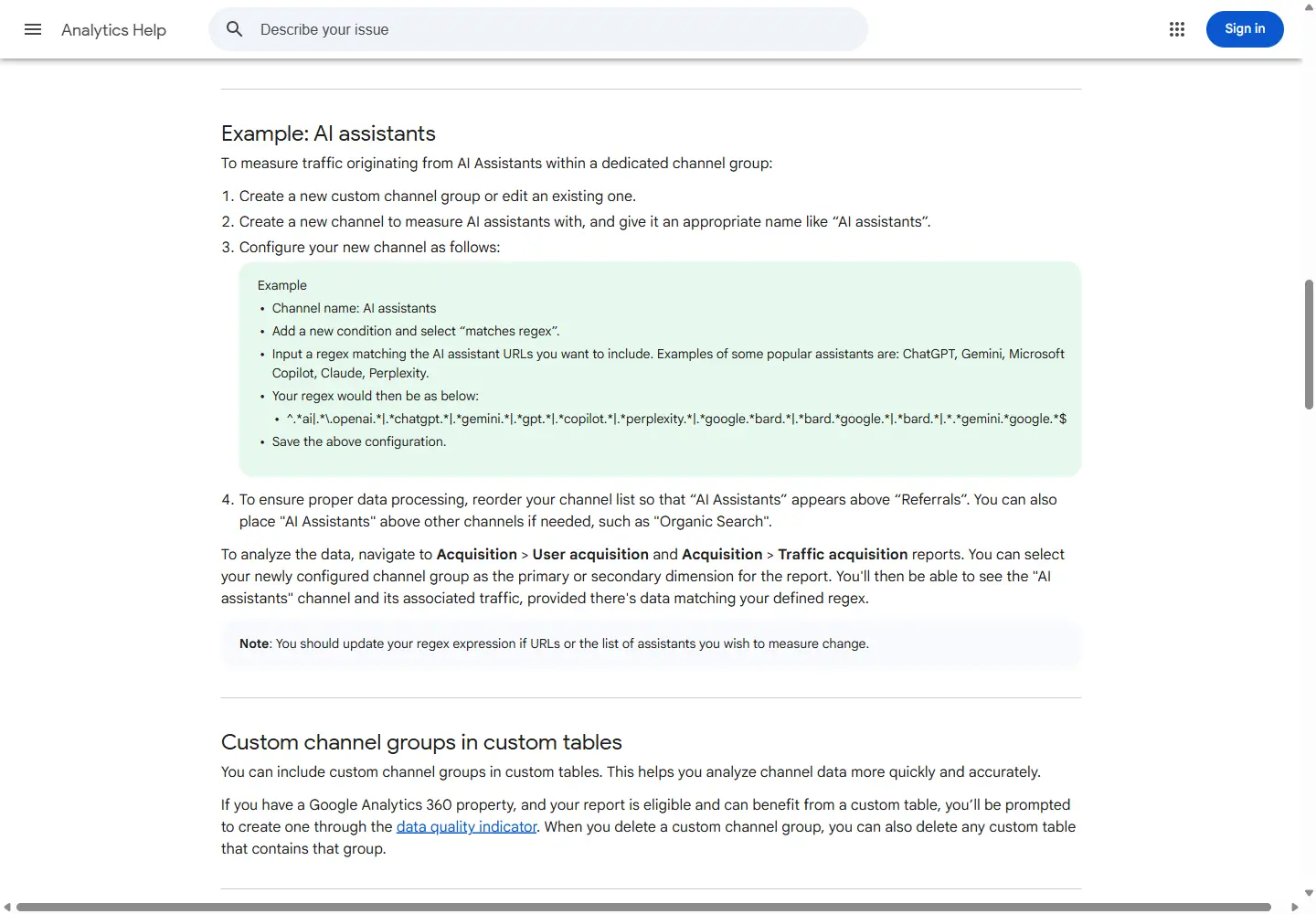
Everything happens in Admin, under Data display. You need an Editor role or above on the property. A group is always created by copying an existing one, the default group if you have never built any.
The example Google publishes does not say which dimension the condition should use. The supported fields for a custom channel group are Campaign id, Campaign name, Default channel group, Manual ad content, Medium, Source and Source platform. For referral traffic, Source is the field that matters.
- In Admin, under Data display, open Channel groups.
- Click Create new channel group to start from a copy of the default group, then name it.
- Click Add new channel and name it AI assistants.
- Add a condition group on the Source dimension, choose "matches regex", then paste your expression.
- Add a second condition on Medium, with "exactly matches" and the value ai-assistant, so you also catch whatever Google recognises on its side.
- Save the channel, click Reorder, drag AI assistants above Referrals and Organic Search, then Apply.
- Save the group, then select it as the primary dimension in Traffic acquisition.
| Watch out for | Consequence |
|---|---|
| Channel order decides the outcome | Traffic lands in the first channel whose definition it matches, a channel sitting below Referrals will never see anything |
| Definitions are not case sensitive | No need to plan for uppercase variants in your expression |
| Deletion is irreversible | Reports, audiences and expanded data sets using the deleted group need a manual update |
| Large field counts degrade reports | Google recommends keeping definitions short and readable |
Real test
The official Google regex, and where it breaks
Google publishes an example regular expression in its help centre. Here it is, unmodified.
^.*ai|.*\.openai.*|.*chatgpt.*|.*gemini.*|.*gpt.*|.*copilot.*|.*perplexity.*|.*google.*bard.*|.*bard.*google.*|.*bard.*|.*.*gemini.*google.*$Results
What the test shows, and what we take from it
Inside a GA4 property, "matches regex" runs as a full match. Universal Analytics ran partial matches, which explains a lot of expressions copied from one tool to another without checking. So we tested the Google expression as a full match, in the RE2 syntax Google uses, against a list of real referrer hosts. Out of twelve hosts, nine match, three do not, and three of the nine that match are not assistants at all. This is not a Google mistake, it is a teaching example copied verbatim into hundreds of properties, where it inflates the AI assistants row with unrelated sites while missing the newest assistants.
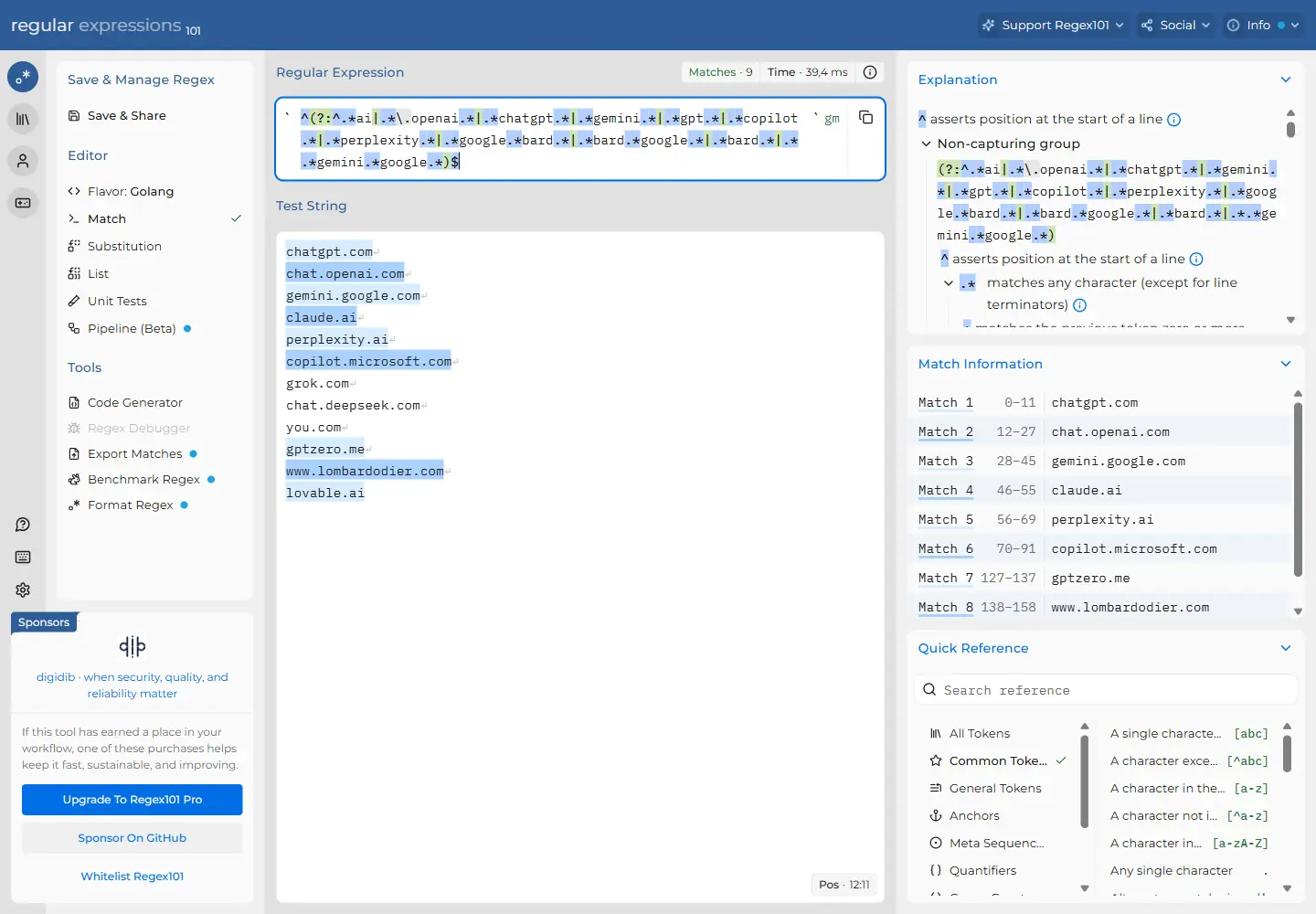
| Referrer host | Result | Comment |
|---|---|---|
| chatgpt.com | Matched | Branch .*chatgpt.* |
| gemini.google.com | Matched | Branch .*gemini.* |
| claude.ai | Matched | Branch ^.*ai, through the top level domain |
| perplexity.ai | Matched | Branch .*perplexity.* |
| copilot.microsoft.com | Matched | Branch .*copilot.* |
| grok.com | Missed | No branch matches, although Google names Grok for the native channel |
| chat.deepseek.com | Missed | No branch matches, although Google names Deepseek for the native channel |
| you.com | Missed | No branch matches |
| gptzero.me | False positive | Branch .*gpt.*, on a site that is not an assistant |
| www.lombardodier.com | False positive | Branch .*bard.*, which catches any string containing bard |
| lovable.ai | False positive | Branch ^.*ai, which catches every dot ai domain |
Template
A safer expression, to be maintained monthly
We prefer an explicit host list. It takes longer to write, it needs a regular review, and it produces no false positives. The optional www prefix covers both forms you will see in the Source dimension. We ran this expression against the same hosts, with fifteen correct matches and no false positive.
^(www\.)?(chatgpt\.com|chat\.openai\.com|openai\.com|gemini\.google\.com|claude\.ai|perplexity\.ai|copilot\.microsoft\.com|grok\.com|x\.ai|chat\.deepseek\.com|chat\.mistral\.ai|meta\.ai|you\.com|poe\.com)$- Review the list every month, assistants appear and disappear quickly.
- Only add a host after seeing it in your own Session source / medium report.
- Keep the Medium exactly matches ai-assistant condition alongside it, so you catch what Google recognises before you do.
- Store the expression in your internal documentation, with its last review date.
UTM
Which UTM parameters actually exist
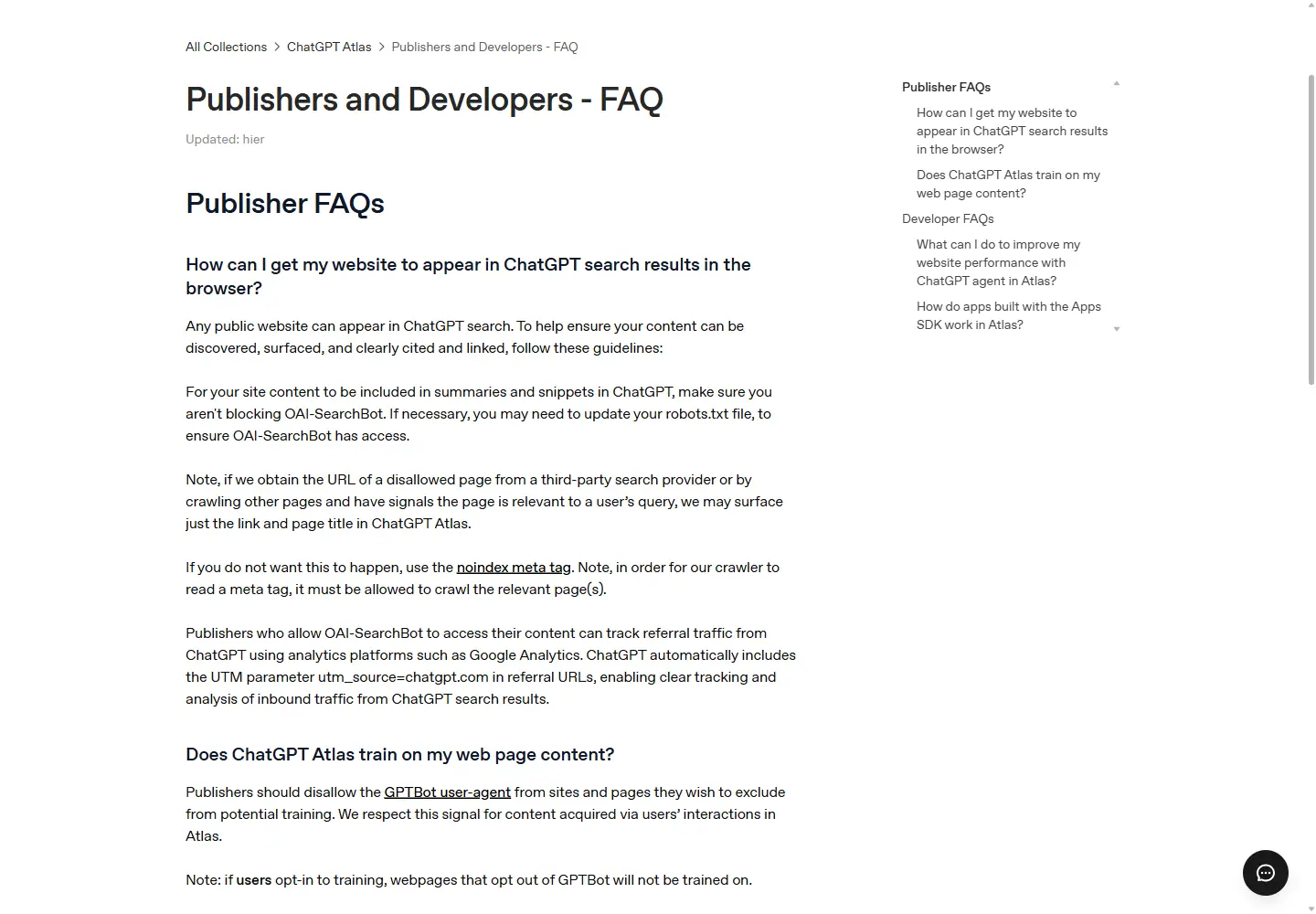
Exactly one parameter is publicly documented today. OpenAI states in its help centre that ChatGPT automatically includes utm_source=chatgpt.com in referral URLs, so publishers can track inbound traffic from ChatGPT search results. No utm_medium or utm_campaign comes with it.
That detail matters more than it looks. A UTM parameter travels inside the URL, so it survives where the referrer does not, for instance when the link opens from a native app. Google recommends always setting utm_source, utm_medium and utm_campaign together, and warns that missing parameters produce (not set) values in reporting. You inherit a useful but incomplete signal that you do not control.
For Gemini, Claude, Copilot and Perplexity, we found no public documentation describing an outbound UTM parameter as of this guide publication date. We cannot give you a complete list, and we would not copy the lists circulating elsewhere without checking them first.
- Open Traffic acquisition and switch to Session source / medium.
- Search for chatgpt, perplexity, gemini, claude, copilot and grok, one at a time.
- Write down the exact values, they are the input to your regular expression.
- Repeat the exercise monthly, referrers and parameters change without notice.
OpenAI Help Center, Publishers and Developers FAQ | Google Analytics Help, collect campaign data with URLs
ROI
Tie that traffic to key events and revenue
Counting sessions proves nothing. What matters is what those sessions produce, and how they compare with your other channels over the same period.
- Mark your decisive events as key events, in Admin then Events.
- In Traffic acquisition, keep the Key events, Session key event rate and Total revenue columns.
- Compare the AI Assistants row with Organic Search and Direct over the same date range.
- Open a free-form exploration, dimension Session source, metrics Sessions, Key events and Total revenue, to drill down to the referrer.
- Cross it with the landing page to learn which content actually converts that traffic.
| Metric | What it tells you | The trap |
|---|---|---|
| Sessions | How many visits started from an assistant | A small volume can hide a high value per visit |
| Key events | How many times an event marked as key was triggered | Nothing shows up if you never marked an event as key |
| Session key event rate | The share of sessions that trigger a key event | Unstable on small volumes, read it over a long window |
| Total revenue | Purchases, in-app purchases, subscriptions and ad revenue | Zero when the purchase event ships without value or currency |
Go further. How to measure GEO ROI | AI share of voice, definition
Blind spot
Why part of your AI traffic stays in Direct
A session lands in Direct when GA4 receives no source information at all. Google groups the causes into three families, missing tracking information, direct access, and ad blockers. Links without UTM parameters, redirects between protocols and URL shorteners can strip the referral detail. Assistants are hit particularly hard by this. An answer read inside a desktop or mobile app is not a web page, and depending on how the link opens, no referrer is passed at all. The AI Assistants channel is a floor, not a total. Treat it as a minimum, and watch how Direct moves over the same periods before you conclude anything from a drop.
Browser referrer policy adds another layer. Since the November 2020 revision of the specification, the default is strict-origin-when-cross-origin, meaning only the origin is sent when navigating to another site, and nothing is sent when going from HTTPS down to HTTP. That is why the Source dimension holds a hostname rather than a conversation URL, and why a site still served over HTTP loses its referrers entirely.
- Native and desktop apps do not always pass a referrer.
- Going from HTTPS to HTTP, the browser drops the referrer.
- URL shorteners and redirect chains can lose the source information on the way.
- Ad blockers and privacy extensions can prevent collection entirely.
- A strict Referrer-Policy on the platform side trims the referrer to the origin or removes it.
Google Analytics Help, understand (direct) / (none) traffic | MDN, Referrer-Policy header
Comparison
GA4, server logs, citations and visibility tracking
These four measurements answer four different questions. Conflating them produces reports that contradict each other month to month. Here is what each one covers.
| Measurement | Question it answers | What it cannot see |
|---|---|---|
| GA4 | How many people clicked through from an assistant, and what those visits produce | Citations without a click, sessions that lost their referrer, AI Overviews counted as organic |
| Server logs | Which AI crawlers hit which pages, how often, with which response code | Human behaviour, conversion, and how the fetched content is actually used |
| Citations | Which of your URLs are genuinely cited inside assistant answers | Traffic volume, revenue, and how you stack up against competitors |
| Visibility tracking | Which prompts surface your brand, in which position, against whom | Visit counts and the revenue generated |
Hikoo resources on these four measurements. Search Console for AI | Search Console generative AI report | Find the sources shaping LLM answers | Check AI crawler access
Routine
Your monthly checklist
This is not a set-and-forget configuration. Referrers change, assistants appear, and Google updates its list without announcing it. Here is the routine we run.
- Re-read Session source / medium over thirty days and note any new hosts.
- Update the AI assistants channel expression, and stamp it with the review date.
- Check the channel is still ordered above Referrals and Organic Search.
- Compare AI Assistants, Organic Search and Direct over the last three months.
- Check key events and revenue attributed to the AI Assistants row.
- Cross it with generative AI impressions in Search Console to cover AI Overviews.
- Log any unexplained gap, most of them come from a lost referrer.
Hikoo tools for this routine. Reporting agent | Site agent | Free AI audit
Frequently asked questions
Does GA4 separate ChatGPT, Gemini and Perplexity automatically?
No. The AI Assistants channel aggregates every recognised assistant into a single row. To split platforms, switch to the Session source dimension, or build a custom channel group with one channel per assistant. The second option costs more maintenance, but it gives you rows that stay stable over time.
Does the AI Assistants channel include Google AI Overviews?
No, and the documentation says so explicitly. Clicks from AI Overviews and AI Mode are counted in the Organic Search channel, whose official definition now includes them. To follow those two surfaces you need the generative AI performance report in Search Console.
Does a custom channel group apply to my historical data?
Yes for reports, Google states that custom channel groups can be applied retroactively. No for BigQuery, where they are not exported, and no for the Key events paths report. Promoting a custom group to the property primary channel group, by contrast, only affects data from that point forward.
How many channel groups can I create?
Two custom groups on top of the default one on a standard property, five on a 360 property, with a maximum of fifty channels per group. Deletion is irreversible and leaves the affected reports, audiences and expanded data sets showing the dimension as unavailable.
Why does my ChatGPT traffic sometimes show up as Direct?
Because GA4 received no source information. That happens when the link opens from a native app, when a redirect or URL shortener strips the referrer, when the destination drops from HTTPS to HTTP, or when an extension blocks collection. The utm_source=chatgpt.com parameter OpenAI adds limits the problem without solving it.
Should I use the regex Google publishes as is?
We would not. Our 29 July 2026 test shows it misses grok.com and chat.deepseek.com, and catches unrelated hosts such as gptzero.me or any dot ai domain. An explicit host list, reviewed monthly, gives cleaner rows.
Is GA4 enough to run an AI visibility strategy?
No. GA4 only counts clicks, while most of the value of a citation happens before the click, inside the answer itself. You need citation tracking on top of it, log analysis for crawlers, and visibility tracking across a stable prompt set.
Is the AI Assistants channel available on every property?
Google announced the feature on 13 May 2026 for Google Analytics properties, without publishing a detailed rollout schedule or the list of recognised referrers. If the row does not appear in your report, first check that you had matching traffic during the period, then inspect the raw Session source / medium values.
Where to start
Start small. Open Traffic acquisition, read Session source / medium over thirty days, write down the hosts you actually see. Then create an AI assistants channel from an explicit list, order it above Referrals, and wire your key events to it. That gives you an honest baseline in about an hour.
What GA4 will never tell you is which prompts surface your brand, against which competitors, and which pages assistants actually cite. That is exactly what Hikoo measures, alongside your GA4 reports. Our free audit gives you a first read without any installation.
Sources
- 1Google Analytics Help Default channel group. Google, consulté le 29 juillet 2026
- 2Google Analytics Help What's new in Google Analytics, 13 May 2026. Google, consulté le 29 juillet 2026
- 3Google Analytics Help Custom channel groups. Google, consulté le 29 juillet 2026
- 4Google Analytics Help Traffic acquisition report. Google, consulté le 29 juillet 2026
- 5Google Analytics Help Understand (direct) / (none) traffic. Google, consulté le 29 juillet 2026
- 6Google Analytics Help About regular expressions (regex). Google, consulté le 29 juillet 2026
- 7Google Analytics Help Collect campaign data with custom URLs. Google, consulté le 29 juillet 2026
- 8OpenAI Help Center Publishers and Developers FAQ. OpenAI, consulté le 29 juillet 2026
- 9MDN Web Docs Referrer-Policy header. Mozilla, consulté le 29 juillet 2026

'%20d='M0%204h48v1h-48z'/%3E%3Cpattern%20id='d1'%20width='2'%20height='2'%20patternUnits='userSpaceOnUse'%3E%3Cpath%20fill='%23e5b53c'%20d='M0%200h1v1H0zM1%201h1v1H1z'/%3E%3C/pattern%3E%3Cpath%20fill='url(%23d1)'%20d='M0%209h48v1h-48z'/%3E%3Cpattern%20id='d2'%20width='2'%20height='2'%20patternUnits='userSpaceOnUse'%3E%3Cpath%20fill='%23d5a11b'%20d='M0%200h1v1H0zM1%201h1v1H1z'/%3E%3C/pattern%3E%3Cpath%20fill='url(%23d2)'%20d='M0%2014h48v1h-48z'/%3E%3Cpattern%20id='d3'%20width='2'%20height='2'%20patternUnits='userSpaceOnUse'%3E%3Cpath%20fill='%23b1861b'%20d='M0%200h1v1H0zM1%201h1v1H1z'/%3E%3C/pattern%3E%3Cpath%20fill='url(%23d3)'%20d='M0%2019h48v1h-48z'/%3E%3Cpath%20fill='%23FFFDFB'%20fill-opacity='.75'%20d='M5%208h1v1h-1zM20%202h1v1h-1zM19%206h1v1h-1zM28%207h1v1h-1zM43%209h1v1h-1zM35%202h1v1h-1zM18%203h1v1h-1zM10%205h1v1h-1zM38%203h1v1h-1z'/%3E%3Cpath%20fill='%2316151a'%20fill-opacity='.55'%20d='M9%203h2v2h-2zM11%203h2v2h-2zM13%203h2v2h-2zM15%203h2v2h-2zM17%203h2v2h-2zM9%205h2v2h-2zM17%205h2v2h-2zM19%205h2v2h-2zM9%207h2v2h-2zM19%207h2v2h-2zM9%209h2v2h-2zM13%209h2v2h-2zM15%209h2v2h-2zM19%209h2v2h-2zM9%2011h2v2h-2zM19%2011h2v2h-2zM9%2013h2v2h-2zM13%2013h2v2h-2zM15%2013h2v2h-2zM19%2013h2v2h-2zM9%2015h2v2h-2zM19%2015h2v2h-2zM9%2017h2v2h-2zM11%2017h2v2h-2zM13%2017h2v2h-2zM15%2017h2v2h-2zM17%2017h2v2h-2zM19%2017h2v2h-2z'/%3E%3Cpath%20fill='%23FFFDFB'%20d='M8%202h2v2h-2zM10%202h2v2h-2zM12%202h2v2h-2zM14%202h2v2h-2zM16%202h2v2h-2zM8%204h2v2h-2zM16%204h2v2h-2zM18%204h2v2h-2zM8%206h2v2h-2zM18%206h2v2h-2zM8%208h2v2h-2zM12%208h2v2h-2zM14%208h2v2h-2zM18%208h2v2h-2zM8%2010h2v2h-2zM18%2010h2v2h-2zM8%2012h2v2h-2zM12%2012h2v2h-2zM14%2012h2v2h-2zM18%2012h2v2h-2zM8%2014h2v2h-2zM18%2014h2v2h-2zM8%2016h2v2h-2zM10%2016h2v2h-2zM12%2016h2v2h-2zM14%2016h2v2h-2zM16%2016h2v2h-2zM18%2016h2v2h-2z'/%3E%3Cpath%20fill='%234f3e1a'%20d='M0%2021h4v6h-4zM4%2023h5v4h-5zM9%2023h3v4h-3zM12%2020h6v7h-6zM18%2022h4v5h-4zM22%2023h5v4h-5zM27%2024h4v3h-4zM31%2024h5v3h-5zM36%2024h7v3h-7zM43%2020h7v7h-7z'/%3E%3Cpath%20fill='%23F4C533'%20d='M1%2023h1v1h-1zM5%2026h1v1h-1zM10%2025h1v1h-1zM13%2025h1v1h-1zM19%2025h1v1h-1zM20%2023h1v1h-1zM23%2025h1v1h-1zM23%2025h1v1h-1zM28%2025h1v1h-1zM34%2026h1v1h-1zM33%2025h1v1h-1zM41%2025h1v1h-1zM45%2022h1v1h-1zM46%2021h1v1h-1z'/%3E%3C/svg%3E)
'%20d='M0%204h48v1h-48z'/%3E%3Cpattern%20id='d1'%20width='2'%20height='2'%20patternUnits='userSpaceOnUse'%3E%3Cpath%20fill='%23e4b336'%20d='M0%200h1v1H0zM1%201h1v1H1z'/%3E%3C/pattern%3E%3Cpath%20fill='url(%23d1)'%20d='M0%209h48v1h-48z'/%3E%3Cpattern%20id='d2'%20width='2'%20height='2'%20patternUnits='userSpaceOnUse'%3E%3Cpath%20fill='%23d09d1b'%20d='M0%200h1v1H0zM1%201h1v1H1z'/%3E%3C/pattern%3E%3Cpath%20fill='url(%23d2)'%20d='M0%2014h48v1h-48z'/%3E%3Cpattern%20id='d3'%20width='2'%20height='2'%20patternUnits='userSpaceOnUse'%3E%3Cpath%20fill='%23ab821b'%20d='M0%200h1v1H0zM1%201h1v1H1z'/%3E%3C/pattern%3E%3Cpath%20fill='url(%23d3)'%20d='M0%2019h48v1h-48z'/%3E%3Cpath%20fill='%23FFFDFB'%20fill-opacity='.75'%20d='M38%206h1v1h-1zM37%204h1v1h-1zM4%201h1v1h-1zM8%205h1v1h-1zM12%203h1v1h-1zM31%207h1v1h-1zM7%202h1v1h-1zM14%201h1v1h-1zM38%203h1v1h-1z'/%3E%3Cpath%20fill='%2316151a'%20fill-opacity='.55'%20d='M31%203h2v2h-2zM33%203h2v2h-2zM35%203h2v2h-2zM37%203h2v2h-2zM39%203h2v2h-2zM31%205h2v2h-2zM39%205h2v2h-2zM41%205h2v2h-2zM31%207h2v2h-2zM41%207h2v2h-2zM31%209h2v2h-2zM35%209h2v2h-2zM37%209h2v2h-2zM41%209h2v2h-2zM31%2011h2v2h-2zM41%2011h2v2h-2zM31%2013h2v2h-2zM35%2013h2v2h-2zM37%2013h2v2h-2zM41%2013h2v2h-2zM31%2015h2v2h-2zM41%2015h2v2h-2zM31%2017h2v2h-2zM33%2017h2v2h-2zM35%2017h2v2h-2zM37%2017h2v2h-2zM39%2017h2v2h-2zM41%2017h2v2h-2z'/%3E%3Cpath%20fill='%23FFFDFB'%20d='M30%202h2v2h-2zM32%202h2v2h-2zM34%202h2v2h-2zM36%202h2v2h-2zM38%202h2v2h-2zM30%204h2v2h-2zM38%204h2v2h-2zM40%204h2v2h-2zM30%206h2v2h-2zM40%206h2v2h-2zM30%208h2v2h-2zM34%208h2v2h-2zM36%208h2v2h-2zM40%208h2v2h-2zM30%2010h2v2h-2zM40%2010h2v2h-2zM30%2012h2v2h-2zM34%2012h2v2h-2zM36%2012h2v2h-2zM40%2012h2v2h-2zM30%2014h2v2h-2zM40%2014h2v2h-2zM30%2016h2v2h-2zM32%2016h2v2h-2zM34%2016h2v2h-2zM36%2016h2v2h-2zM38%2016h2v2h-2zM40%2016h2v2h-2z'/%3E%3Cpath%20fill='%234f3e1a'%20d='M0%2024h7v3h-7zM7%2023h4v4h-4zM11%2021h7v6h-7zM18%2023h6v4h-6zM24%2023h5v4h-5zM29%2023h4v4h-4zM33%2023h6v4h-6zM39%2021h7v6h-7zM46%2023h3v4h-3z'/%3E%3Cpath%20fill='%23F4C533'%20d='M3%2026h1v1h-1zM9%2024h1v1h-1zM9%2024h1v1h-1zM19%2025h1v1h-1zM27%2025h1v1h-1zM26%2024h1v1h-1zM44%2026h1v1h-1zM47%2025h1v1h-1z'/%3E%3C/svg%3E)
'%20d='M0%204h48v1h-48z'/%3E%3Cpattern%20id='d1'%20width='2'%20height='2'%20patternUnits='userSpaceOnUse'%3E%3Cpath%20fill='%23e3b02f'%20d='M0%200h1v1H0zM1%201h1v1H1z'/%3E%3C/pattern%3E%3Cpath%20fill='url(%23d1)'%20d='M0%209h48v1h-48z'/%3E%3Cpattern%20id='d2'%20width='2'%20height='2'%20patternUnits='userSpaceOnUse'%3E%3Cpath%20fill='%23c9981b'%20d='M0%200h1v1H0zM1%201h1v1H1z'/%3E%3C/pattern%3E%3Cpath%20fill='url(%23d2)'%20d='M0%2014h48v1h-48z'/%3E%3Cpattern%20id='d3'%20width='2'%20height='2'%20patternUnits='userSpaceOnUse'%3E%3Cpath%20fill='%23a57e1b'%20d='M0%200h1v1H0zM1%201h1v1H1z'/%3E%3C/pattern%3E%3Cpath%20fill='url(%23d3)'%20d='M0%2019h48v1h-48z'/%3E%3Cpath%20fill='%23FFFDFB'%20fill-opacity='.75'%20d='M43%200h1v1h-1zM43%203h1v1h-1zM41%203h1v1h-1zM2%203h1v1h-1zM21%200h1v1h-1zM11%203h1v1h-1zM19%202h1v1h-1zM15%206h1v1h-1zM44%201h1v1h-1z'/%3E%3Cpath%20fill='%2316151a'%20fill-opacity='.55'%20d='M11%203h2v2h-2zM13%203h2v2h-2zM15%203h2v2h-2zM17%203h2v2h-2zM19%203h2v2h-2zM11%205h2v2h-2zM19%205h2v2h-2zM21%205h2v2h-2zM11%207h2v2h-2zM21%207h2v2h-2zM11%209h2v2h-2zM15%209h2v2h-2zM17%209h2v2h-2zM21%209h2v2h-2zM11%2011h2v2h-2zM21%2011h2v2h-2zM11%2013h2v2h-2zM15%2013h2v2h-2zM17%2013h2v2h-2zM21%2013h2v2h-2zM11%2015h2v2h-2zM21%2015h2v2h-2zM11%2017h2v2h-2zM13%2017h2v2h-2zM15%2017h2v2h-2zM17%2017h2v2h-2zM19%2017h2v2h-2zM21%2017h2v2h-2z'/%3E%3Cpath%20fill='%23FFFDFB'%20d='M10%202h2v2h-2zM12%202h2v2h-2zM14%202h2v2h-2zM16%202h2v2h-2zM18%202h2v2h-2zM10%204h2v2h-2zM18%204h2v2h-2zM20%204h2v2h-2zM10%206h2v2h-2zM20%206h2v2h-2zM10%208h2v2h-2zM14%208h2v2h-2zM16%208h2v2h-2zM20%208h2v2h-2zM10%2010h2v2h-2zM20%2010h2v2h-2zM10%2012h2v2h-2zM14%2012h2v2h-2zM16%2012h2v2h-2zM20%2012h2v2h-2zM10%2014h2v2h-2zM20%2014h2v2h-2zM10%2016h2v2h-2zM12%2016h2v2h-2zM14%2016h2v2h-2zM16%2016h2v2h-2zM18%2016h2v2h-2zM20%2016h2v2h-2z'/%3E%3Cpath%20fill='%234f3e1a'%20d='M0%2023h7v4h-7zM7%2020h5v7h-5zM12%2024h4v3h-4zM16%2021h4v6h-4zM20%2020h4v7h-4zM24%2022h3v5h-3zM27%2022h4v5h-4zM31%2019h3v8h-3zM34%2019h3v8h-3zM37%2021h6v6h-6zM43%2023h5v4h-5z'/%3E%3Cpath%20fill='%23F4C533'%20d='M2%2024h1v1h-1zM13%2026h1v1h-1zM18%2022h1v1h-1zM29%2024h1v1h-1zM29%2025h1v1h-1zM32%2021h1v1h-1zM32%2025h1v1h-1zM39%2024h1v1h-1z'/%3E%3C/svg%3E)