To get cited by Gemini, your page first has to be crawlable by Googlebot and present in the Google Search index, because grounding in Gemini Apps means feeding the model content from that index at prompt time. Google-Extended is the only token that governs this use, and Google states plainly that it does not affect inclusion or ranking in Google Search. AI Overviews and AI Mode depend on Googlebot and on the Search generative AI control in Search Console, not on Google-Extended. No setting, tag or file guarantees a citation.
How do you get cited by Gemini in 2026?
Three conditions stack. Your page must be crawlable by Googlebot and indexed in Google Search, it must not be excluded by the Google-Extended token, and its content has to answer the prompt precisely enough that the model gains something by leaning on it. No tag and no file guarantees a citation.
The reason sits in the mechanism Google documents. Grounding is defined in the crawler documentation as providing content from the Google Search index to the model at prompt time, to improve factuality and relevancy. In other words, the front door of Gemini Apps is still the Search index, filled by Googlebot. A page missing from that index does not become citable because it is well written or well marked up, and a site that blocks Googlebot removes itself from generated answers and classic results alike. The check takes three moves, one request against your robots.txt to confirm Googlebot gets through, one URL inspection in Search Console to confirm indexing, and one read of the HTML served without JavaScript to confirm the useful text is actually there. Until those three are green, every editorial optimization stays theoretical.
The second condition is an independent control, Google-Extended, which decides whether your content may feed grounding in Gemini Apps and training for future models. The third is editorial, and it is the only one a content team really works on day to day.
- Confirm the page returns a 200 to Googlebot and is indexed, before touching the content.
- Take an explicit position on Google-Extended, since leaving it allowed is the only way to stay eligible for grounding in Gemini Apps.
- Treat each surface separately, because a control that protects your content on one has no effect on the others.
- Measure on a stable prompt panel rather than a single answer, since a generated answer is never reproduced identically.
Google, common crawlers and Google-Extended | Google, AI features and your website
Read next. How to appear in AI Overviews | robots.txt for AI crawlers | How to get cited by Perplexity
Gemini Apps, AI Overviews, AI Mode and Google Search are four distinct surfaces
Collapsing these four surfaces into one causes most of the bad calls we see in audits. They share the same model family and often the same index, yet they expose different controls, different reports and different citation behaviour.
Gemini Apps means the assistant at gemini.google.com and in the mobile app. AI Overviews and AI Mode are two features of Google Search, governed from Search Console, and Google states that both may use a query fan-out technique, issuing multiple related searches to build a response. Classic results remain the historical layer your rank tracking has measured for fifteen years. The same page can appear in one of these contexts and stay absent from the other three.
| Surface | What feeds the answer | Owner control | Official Google report |
|---|---|---|---|
| Gemini Apps | Gemini models plus grounding on Search index content served at prompt time | Google-Extended | None |
| AI Overviews | Search index crawled by Googlebot, with query fan-out | Preview controls and the Search generative AI control in Search Console | Generative AI performance report, impressions |
| AI Mode | Search index crawled by Googlebot, query fan-out and Gemini models | Preview controls and the Search generative AI control in Search Console | Generative AI performance report, impressions |
| Classic results | Search index crawled by Googlebot | robots.txt, noindex, preview controls | Search performance report |
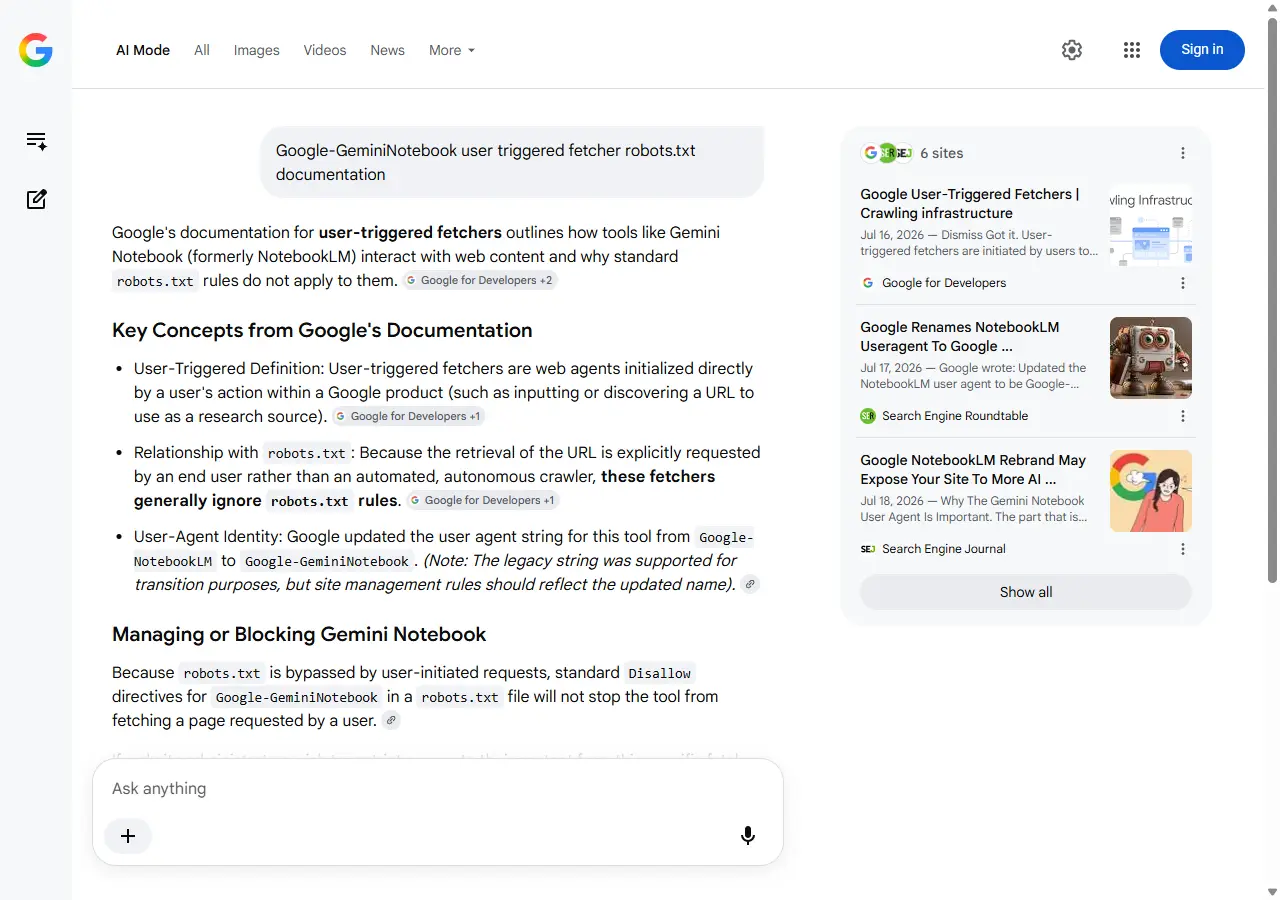
Google, AI features and your website | Google, Gemini 3 in Search and AI Mode
Definitions. AI Overviews | AI citations
What does Google-Extended actually control?
Google-Extended is a control token, not a crawler. The common crawlers documentation is explicit, it has no separate HTTP request user agent string, crawling is done with existing Google user agent strings, and the robots.txt token is used in a control capacity. You will therefore never see Google-Extended in your server logs, which is why so many teams wrongly conclude that it does nothing.
Its scope is written plainly. Google-Extended lets a publisher manage whether crawled content may be used to train future generations of the Gemini models that power Gemini Apps and the Vertex AI API for Gemini, and whether it may be used for grounding in Gemini Apps and in Grounding with Google Search on Vertex AI. The next sentence matters most to an SEO lead, Google-Extended does not impact a site inclusion in Google Search nor is it used as a ranking signal in Google Search. Blocking the token is therefore a deliberate editorial trade, with a precise cost, leaving grounding in Gemini Apps, and without the benefit or the risk many people attach to it on the Search side.
A frequently missed corollary, blocking Google-Extended does not remove you from AI Overviews or AI Mode. Both features rely on the Search index crawled by Googlebot, and Google points to a separate setting, the Search generative AI control in Search Console, to decide your inclusion in those features.
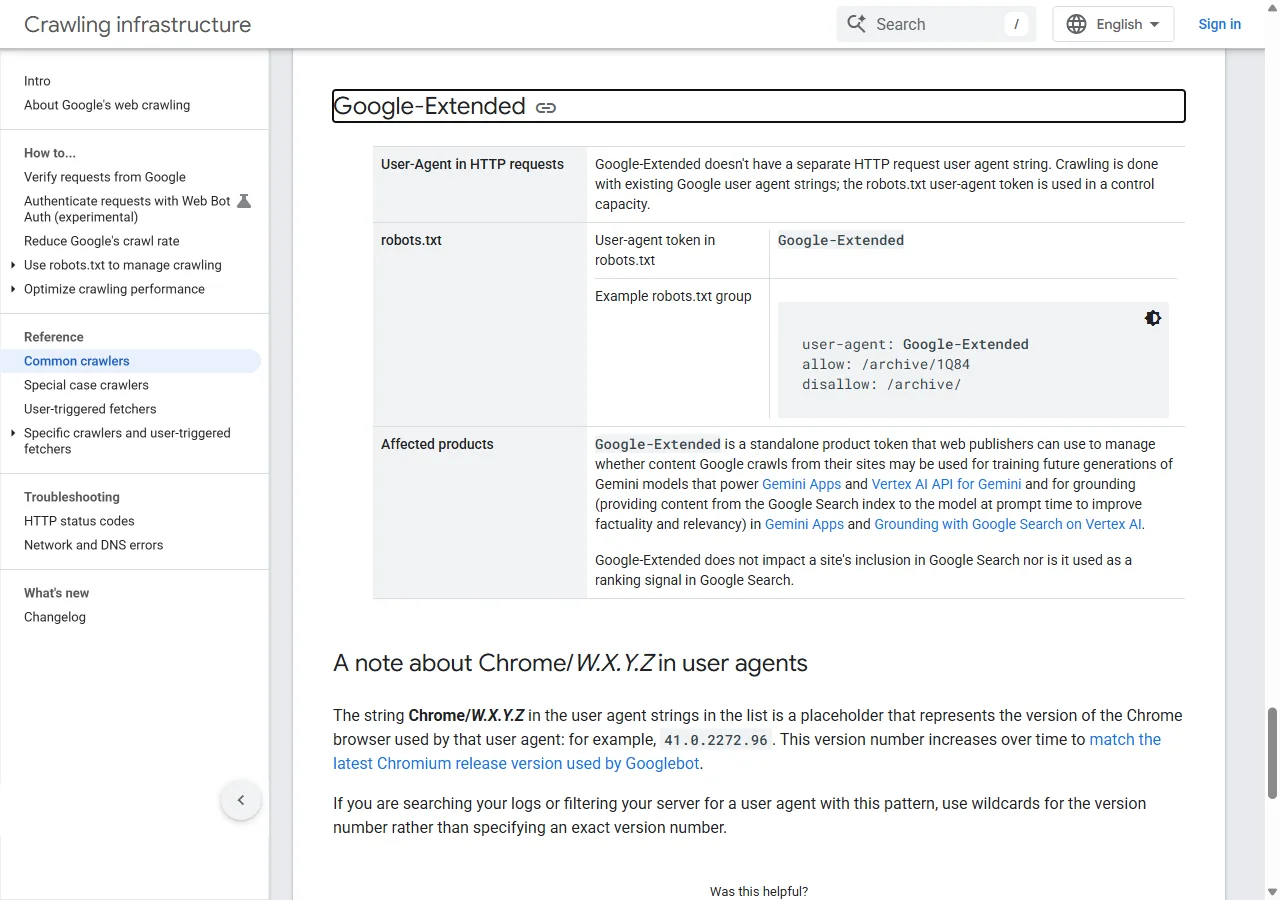
- Searching your logs for Google-Extended to check that it is respected will never return anything, since it has no user agent of its own.
- Blocking Google-Extended to "opt out of Google AI" leaves AI Overviews and AI Mode untouched.
- Blocking Google-Extended does not erase what a model has already absorbed, the directive applies to future use.
- Using Google-Extended to protect confidential content makes no sense, robots.txt being a public file that exposes the paths you want hidden.
Google, common crawlers and Google-Extended | Google, Search generative AI control
What does Gemini read at the moment it answers?
Three paths to the web coexist, and they follow different rules. The first is grounding, which draws on the Search index without an extra HTTP request to your server. The second runs through deep research features, where the official help states that Google Search is included as a source by default and that the user can deselect it to limit research to other selected sources. The third covers fetches triggered by a person, documented separately by Google.
That third family deserves attention because it bypasses robots.txt. Google documents a Gemini Notebook fetcher, whose user agent moved from Google-NotebookLM to Google-GeminiNotebook, which requests the individual URLs users have provided as sources for their projects, plus a Google-Agent used by agents hosted on Google infrastructure to navigate the web and perform actions upon user request. These clients generally ignore robots.txt, exactly like a browser driven by a person. A Disallow rule does not stop them, and the only binding restriction runs through the server or the web application firewall, with the risk of blocking legitimate readers too. Google also reminds publishers that a user agent string can be spoofed, and publishes IP ranges for verifying its own clients. If you decide to filter, filter on the verified address, never on the name declared in the header alone.
For a citation strategy, keep the hierarchy in mind. Grounding decides your presence in most answers, while user-triggered fetchers decide what happens once somebody already pastes your URL, which implies they found you somewhere else first.
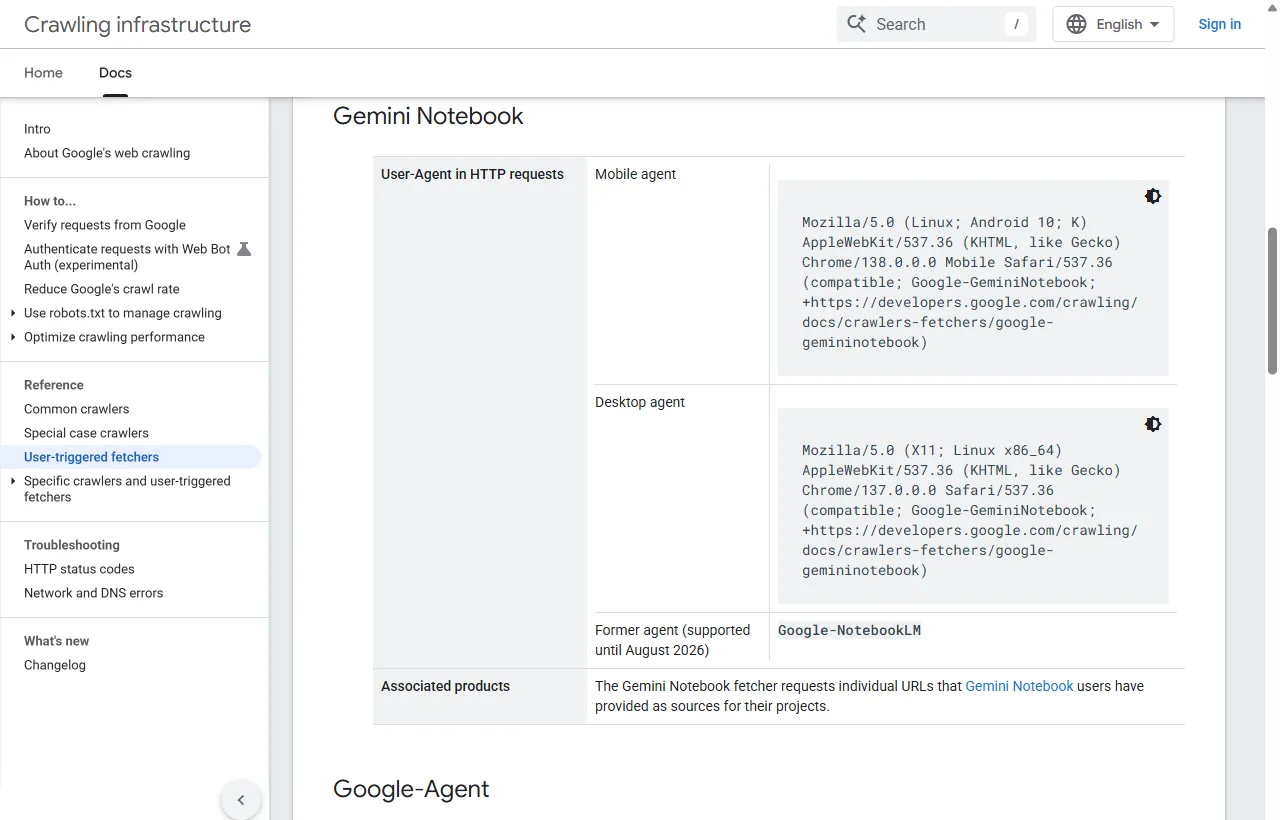
- Keep Googlebot allowed everywhere you want to be cited, that is the entry condition into the index that feeds grounding.
- Do not expect robots.txt to stop Google-GeminiNotebook or Google-Agent, these fetchers act on a person request.
- Serve the same content to bots and humans, since partial server rendering hides your most useful passages from grounding.
- Watch your logs to separate an indexing crawl from a one-off user-triggered fetch.
Google, user-triggered fetchers | Gemini Apps Help, Deep Research | Google, Grounding with Google Search
Useful tools. AI crawler access checker | Prepare your site for AI agents
What makes a page reusable by Gemini?
Google published a dedicated guide to optimizing for generative AI features, and its core message is that SEO best practices remain relevant because these features rely on core Search ranking systems. The AI features page goes further, there are no additional requirements to appear in AI Overviews or AI Mode, nor other special optimizations necessary.
That framing has a practical consequence. The work that pays is what makes a passage self-contained, verifiable and attributable to a named source, not stacking technical artefacts meant to speak to models. A model composing an answer needs an excerpt that answers a sub-question on its own, with dated figures, an explicit method and enough context to be reused without the previous paragraph. That is exactly what query fan-out looks for, since it issues several related searches across subtopics before writing.
| Common belief | What Google documentation says | What we do instead |
|---|---|---|
| Publishing an llms.txt file improves visibility | Google Search does not use them and ignores them | Spend the same hours on server rendering and heading structure |
| Content must be split into very small chunks | There is no requirement to break your content into tiny pieces | Write self-contained passages of 120 to 170 words per sub-question |
| You need a specific writing style for models | You do not need to write in a specific way just for generative AI search | Keep writing that helps readers and source every factual claim |
| Structured data is mandatory | Structured data is not required for generative AI search | Mark up what describes a real entity, without treating it as an eligibility condition |
| Piling up brand mentions forces a citation | Seeking manufactured references is not helpful | Target third-party pages already cited on your topics, for editorial reasons |
- Answer the main question within the first sixty words of the page.
- Give each section a real question as its heading, the one your customers ask out loud.
- Date your figures and name their source in the sentence that carries them.
- Add what only you can write, a measurement you ran, a customer case, a limit you observed.
- Serve the text in the initial HTML, without relying on JavaScript to display the main content.
Google, guide to optimizing for generative AI search | Google, AI features and your website
Which tracking protocol measures your Gemini citations?
A generated answer is never reproduced identically, so an isolated screenshot proves nothing. A usable protocol fixes the prompt panel, the language, the country, the number of repetitions and the surface tested, then records for every run whether the brand is mentioned, whether a linked citation appears, the exact URL cited, its position in the source list and the gap with the previous measurement. You then measure a trend on a stable sample rather than an impression.
The panel is built from real commercial intents, not keywords. Thirty to sixty prompts are enough to start, split between discovery questions, comparisons, implementation questions and vendor searches. Then set a cadence, weekly in a contested market and monthly otherwise, and keep the wording identical from one run to the next. Any rewording breaks the series in a way you can no longer interpret. Repeat each prompt at least three times per run, because two consecutive answers to the same question can cite different sources without a single change on your site. When a new topic becomes a priority, add prompts rather than editing existing ones, and date the addition so you know later which part of the panel is comparable across the whole period.
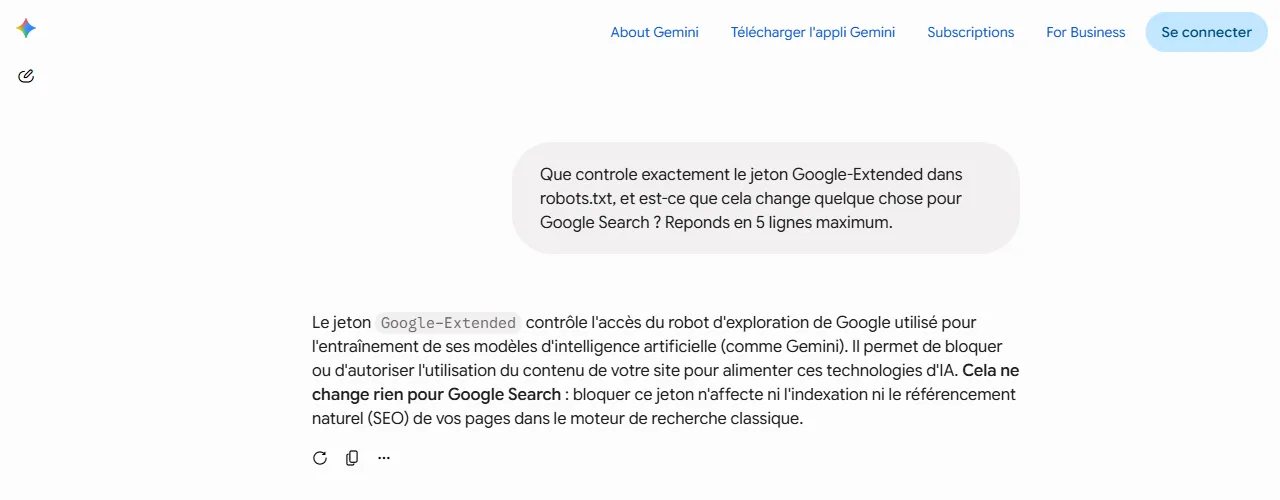
Measurement on the Gemini Apps side stays manual by nature, since no official Google report exposes it. Our capture below shows a concrete limit, in a signed out session the answer renders without source cards, which makes citation logging impossible in that state.
| Field logged | What you record | Why the field matters |
|---|---|---|
| Prompt | The exact wording, frozen over time | Rewording changes the answer and breaks comparability |
| Language and country | fr-FR, en-US, and the country of the session | Cited sources vary sharply by language |
| Surface | Gemini Apps, AI Mode or AI Overviews | Controls and reports differ from one surface to the next |
| Repetition | Three runs minimum, numbered | A generated answer varies with no external cause |
| Mention | The brand is named, yes or no | A mention without a link is still a useful awareness signal |
| Citation | A link to your domain is displayed, yes or no | This is the only event that can produce a visit |
| Cited URL | The exact address, not only the domain | You will know which page to improve or replicate |
| Position | The rank inside the displayed source list | Real visibility drops fast beyond the first few links |
- Write thirty to sixty prompts that match real commercial intents.
- Freeze the language, the country and the surface tested for each one.
- Run every prompt at least three times, in a clean session.
- Log mention, citation, URL and position in an identical grid every time.
- Compare with the previous run and note the site changes made in between.
- Only call an effect real after two consecutive runs point the same way.
Gemini Apps Help, sources and double-checking answers
Go further. Compare your AI visibility with competitors | Spotlight, multi-platform tracking | Free AI visibility audit
Which mistakes push you out of Gemini answers?
Most disappearances we see come from a control mistaken for another one rather than from an editorial problem. A broad block decided in a meeting, a tag copied from an old project or a Search Console setting changed by another team is enough to pull a site out of every generative surface, with nobody connecting the dots.
- Blocking Googlebot to "avoid AI", which also removes you from classic results, AI Overviews, AI Mode and grounding.
- Leaving noindex on useful pages, which can then feed no generative feature at all.
- Applying nosnippet or max-snippet without measuring that these tags also limit what can be shown in AI features.
- Turning off the Search generative AI control in Search Console while believing it only blocks training.
- Expecting a Google-Extended block to remove you from AI Overviews, which will not happen.
- Comparing two captures taken on different dates, languages or countries, then drawing a conclusion about an action.
Google, robots meta tags and data-nosnippet | Google, Search generative AI control
Guided diagnosis. AI crawler access checker | Analyzer
What can you measure on the Google side, and what stays hidden?
Since June 2026, Search Console has exposed a performance report dedicated to generative AI, rolling out gradually to a subset of sites. It covers generative AI features on Search, AI Overviews and AI Mode, with a separate report for Discover, and it excludes Search Labs experiments. The available metric is the impression, meaning how many times links to your site were shown in a generative AI feature on Google Search.
That report does not cover Gemini Apps. No Google interface tells you today how often the Gemini assistant cited your domain, or on which prompts. So you work with two levels of measurement, an official and partial level on Search surfaces, and a protocol level you build yourself for Gemini Apps, completed on the analytics side by referral visits from the assistant domain.
Google, generative AI performance report | Google Search Central, June 2026 announcement
Measurement guides. AI Overviews impressions in Search Console | Search Console for AI | Measure AI traffic in GA4
Frequently asked questions
Does blocking Google-Extended remove my site from AI Overviews?
No. AI Overviews and AI Mode rely on the Search index crawled by Googlebot, while Google-Extended governs training and grounding in Gemini Apps and on Vertex AI. To act on generative AI features in Search, Google points to a separate setting, the Search generative AI control in Search Console.
Do I need an llms.txt file to get cited by Gemini?
No. The official Google guide to optimizing for generative AI search states that Google Search does not use these files and ignores them. Time spent producing one is better invested in server rendering, heading structure and self-contained passages that answer a sub-question on their own.
Does Gemini cite exactly the same sources as Google Search?
Not necessarily. The common ground is the Search index, which grounding draws on, but the final selection depends on the prompt, the language, the surface and how the model breaks the question apart. Two runs of the same prompt can cite different sources with no change at all on your site.
Can I stop Gemini Notebook or Google-Agent from reading a page?
Not with robots.txt. Google documents these clients as user-triggered fetchers that generally ignore robots.txt, since the fetch is requested by a person. A genuinely binding restriction runs through the server or the web application firewall, with the risk of turning away legitimate readers too.
Does Search Console show my citations inside Gemini Apps?
No. The generative AI performance report covers generative AI features in Search and Discover, not the Gemini assistant. For that surface you need a manual log on a frozen prompt panel, completed by referral visits observed in your analytics tool.
Does the Search generative AI control affect my rankings?
Google states that this control only affects whether your content can appear in certain Search generative AI features, and that it is not used as a ranking or inclusion signal affecting other parts of Search. Turning it off prevents your links from being shown in those features and from helping ground those answers.
How long between publishing a page and a first citation?
No official duration exists, and we will not publish an invented average. The only verifiable milestone is indexing, which you check in Search Console. A page that is not indexed cannot feed grounding, so the first useful measurement is the indexing date, then its appearance in your prompt panel.
What we take away
Getting cited by Gemini plays out on three planes, a technical plane that makes you reachable and indexable, a control plane where every surface has its own switch, and an editorial plane where only self-contained, verifiable passages are reusable. The rest is folklore, and Google documentation says so in plain words.
Start by checking access to your pages and your position on Google-Extended, then build a prompt panel you keep identical for several months. If you want a measured starting point on your own domain, our free AI visibility audit analyses your pages and returns a list of fixes ranked by impact.
Sources
- Google Google's common crawlers, Google-Extended. Google Crawling Infrastructure, consulté le 16 août 2026
- Google Google user-triggered fetchers, Gemini Notebook and Google-Agent. Google Crawling Infrastructure, consulté le 16 août 2026
- Google AI features and your website. Google Search Central, 2026
- Google Google's guide to optimizing for generative AI features on Google Search. Google Search Central, 2026
- Google Search generative AI control. Search Console Help, 2026
- Google Generative AI performance report (Search). Search Console Help, 2026
- Google Introducing Search Generative AI performance reports in Search Console. Google Search Central Blog, juin 2026
- Google View related sources and double-check responses from Gemini Apps. Gemini Apps Help, consulté le 16 août 2026
- Google Use Deep Research in Gemini Apps. Gemini Apps Help, consulté le 16 août 2026
- Google Gemini Apps Privacy Hub. Gemini Apps Help, consulté le 16 août 2026
- Google Grounding with Google Search, Gemini API. Google AI for Developers, 2026
- Google Robots meta tags, data-nosnippet and X-Robots-Tag specifications. Google Search Central, 2026
- Google Google brings the Gemini 3 model to Search and AI Mode. The Keyword, Google, 18 novembre 2025